 Jason Thai
Creating a unique and engaging experience for museum goers
The Chau Chak Wing Museum has collections of artifacts that delve into interesting aspects of rich cultural, physical and societal history. However there is a lack of physical/digital guide in allowing visitors to understand or navigate through the physical space of CCWM.
Within this factual scenario developed for the university project - we were enlisted with the task in addressing this problem to which a thorough process was used to do so.
The process used during this student project followed a cohesive procedure which helped in giving a clear directive and flow throughout the project.
A diagram of the process and the accompanying steps can be seen below:
Being able to further understand the problem via looking into doing an overarching research objective and developing research questions helped in guiding the project in a more scoped or narrowed scope manner
In this understanding phase - it involved gaining a deeper and holistic comprehension of the problem at hand (which in this case was the CCWM brief) by framing our own sub-problem under the broader space and scope of the overall brief of serendipity - the main problem and discussion throughout this entire project.
This problem of serendipity was further broken down by splitting it into two proper sections - one being outlining the research objective in detailing the aim of the project and the development of research questions which helped guide the research we conducted by keeping in mind the problem space or questions throughout the process.
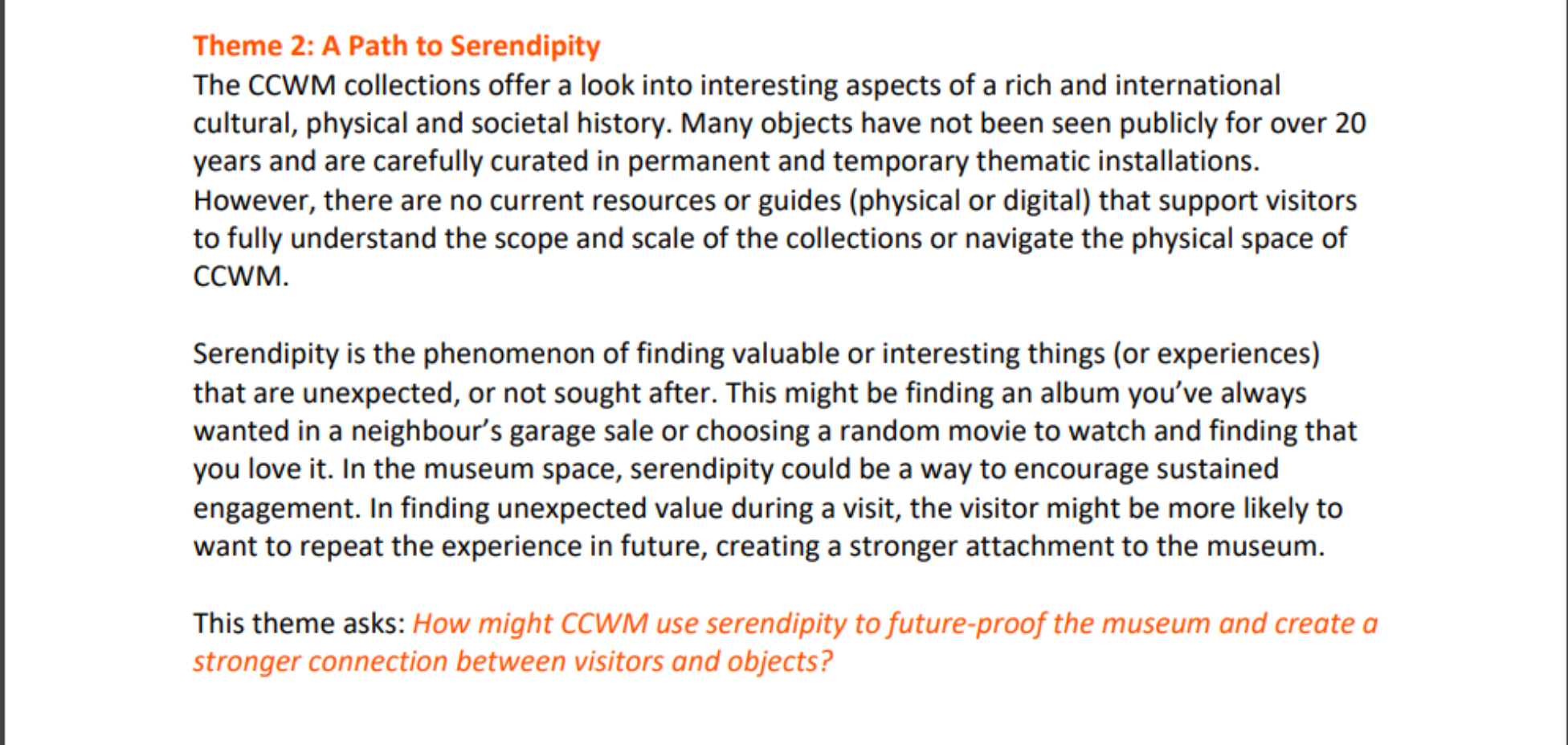
Design Brief of Serendipity
In being able to define an overarching research objective with a required target audience included in it - it would help in being able to have a clear direction and directive from the main design brief to which is more brief and more explanatory on the issue at hand.
Working together with my group - we decided on targeting the undergraduate target audience as we can relate to this audience as we are a part of it - as well as how we notice undergraduates are an underrepresented community within museum settings. As a result the following research objective was formed:
"To employ serendipity purposefully to facilitate connections between undergraduates and exhibits*, whilst encouraging an amorphous experience."
*Exhibits refer to grouped objects and their spatial and physical elements
The development of research questions helps in giving guidance of noticeable areas of focus or issues to keep in mind throughout the research project. These research questions can be seen below:
1. Utilising serendipity purposefully to influence the users experience, without losing key characteristics (such as wonder):
a) What does purposeful serendipity look like?
b) How can purposeful serendipity be used to encourage an engaging and memorable museum experience?
2. How can we use unexpected connections formed by the users to facilitate sustained engagement?
3. How does the environment influence a user’s state of mind?
4. What are the preconceptions that younger demographics have about the Chau Chak Wing museum - in reference to a panel meeting discussing how they had trouble attracting a younger demographic; the main goal being showcasing the diversity of its collection as something that can be appreciated by all ages?
5. What constitutes an immersive digital experience that includes spatial/and or physical elements?
By being able to research more - it helped into gaining more insights and information into how we can address the research objective and questions developed in the understanding phase - researching via following a context-mapping framework
Following the understanding phase in being able to develop direction and guidance to what path the project will go in - the research stage began, whereby we developed the appropriate research methodology (including sensitising, collage framework, cognitive mapping) alongside ensuring our research participants fit the target audience of undergraduates and the appropriate preparations were made before the day of performing our research
Following the understanding phase in being able to develop direction and guidance to what path the project will go in - the research stage began, whereby we developed the appropriate research methodology (including sensitising, collage framework, cognitive mapping) alongside ensuring our research participants fit the target audience of undergraduates and the appropriate preparations were made before the day of performing our research.
Before we decided to interview our participants after being able to prepare them or warm them up via sensitising activities, we prepared all of our documents to bring on the day including our consent forms alongside context mapping activities (including both collage and cognitive mapping activities) to name a few.
More of this is seen in the image below:
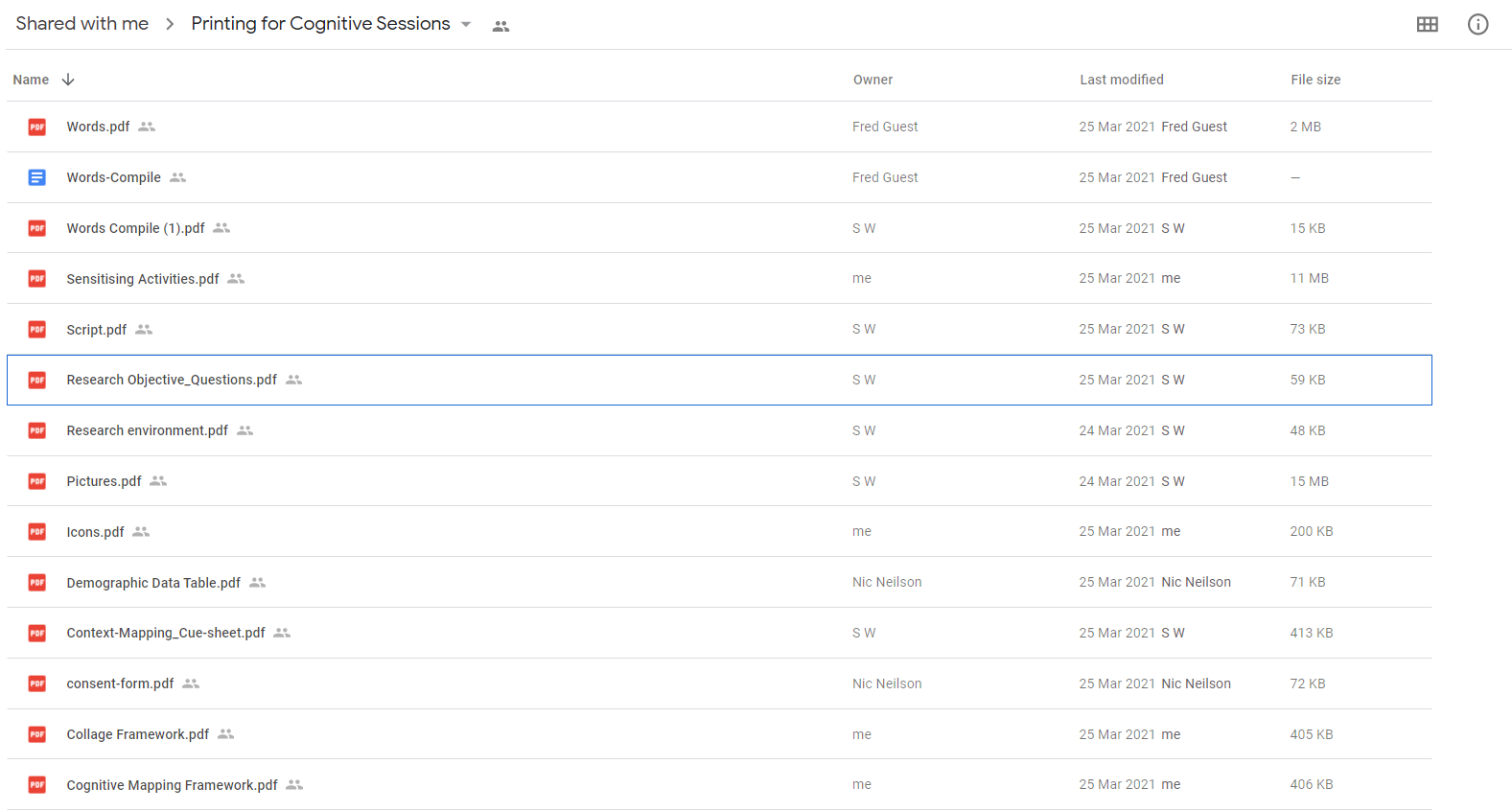
Printing out and preparation files for the day of interviews

On the day - we got our interview participants in walking through the museum to immerse themselves in the space or environment of a museum setting; which will allow for a more interactive and engaging experience for the participants alongside helping us gain more insightful details and information from them in doing so. These participant experiences would help lead or draw into our actual context mapping sessions which would have only been as effective as they were, due to giving the participants the ability to explore the museum on their own accords and time on the day.
Below is a slideshow of the participants on the day:
When it came time to actually beginning our context mapping session for all three of the groups (each group consisting between 3-4 people with a total of 12 people overall) - consent forms and demographic tables were filled out to ensure that our demographic had aligned to the target audience of "undergraduates" (being university students aged 18-21) alongside gaining personal consent from a security and privacy perspective.
Below are examples of these demographic details (not showing the consent forms for confidentially reasons):
The cognitive mapping activities helped in showcasing the user's journey within the Chau Chak Museum from beginning to end, through the use of icons and the freedom and ability in allowing them to additional draw and write additional aspects in what they meant in each step. This allowed us to gain a better perspective and understanding towards their a rich and insightful psyche of their thought processes and emotions throughout this experiment and free journey in exploring the museum at their own pace and choice.
An image slideshow of this can be seen below:
The collage framework helped in gaining the users perspectives on museums from the past and their beliefs and values in their recent Chau Chak Wing museum visit in showcasing the new learnings and perspectives to which occurred in doing so. In being given an additional "like" and "dislike" vertical axis, they are able to express themselves through abstract and conceptual images alongside a wide range of selections of word text images that drew out to them.
In allowing this fun, relaxing and creative collage framework activity - it allowed us to gain a more in-depth and nuanced understanding of the user needs from undergraduate students when it came to museums - crucial aspects which were extended and looked into further during our analysis & synthesis stages as well.
Images of these collage frameworks can be seen below:
Following all of the 3-4 interview sessions we conducted (with each session containing around 3-4 people each), we began to all transcript different parts of the interviews, which whilst was a long and tedious process, was necessary in being able to get of all the interviewee insights and descriptions into visual words that we can refer to and make sense of within our analysis process.
An example of one of the many pages we did altogether (which ranged from 30-40 pages) can be seen below:
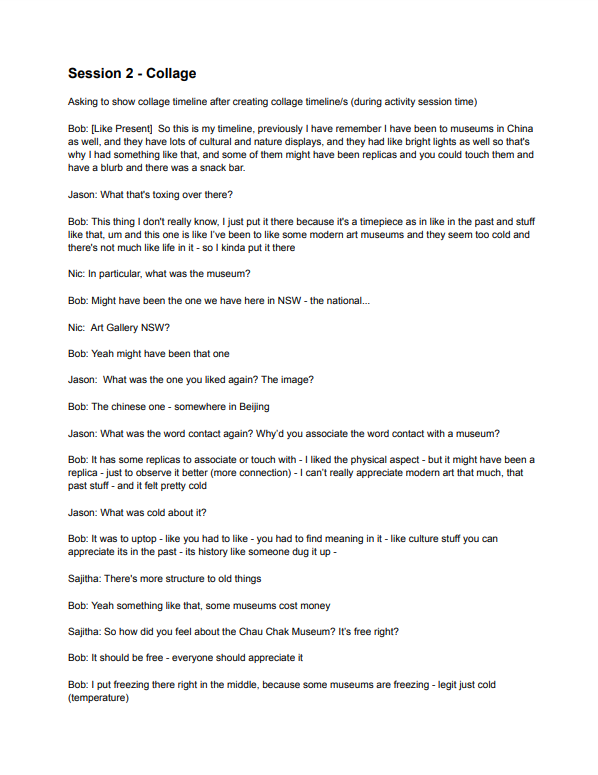
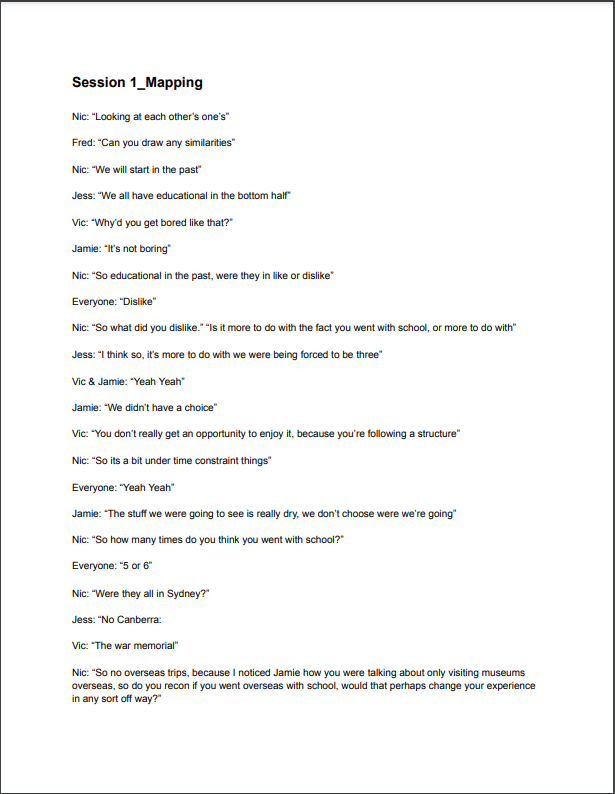
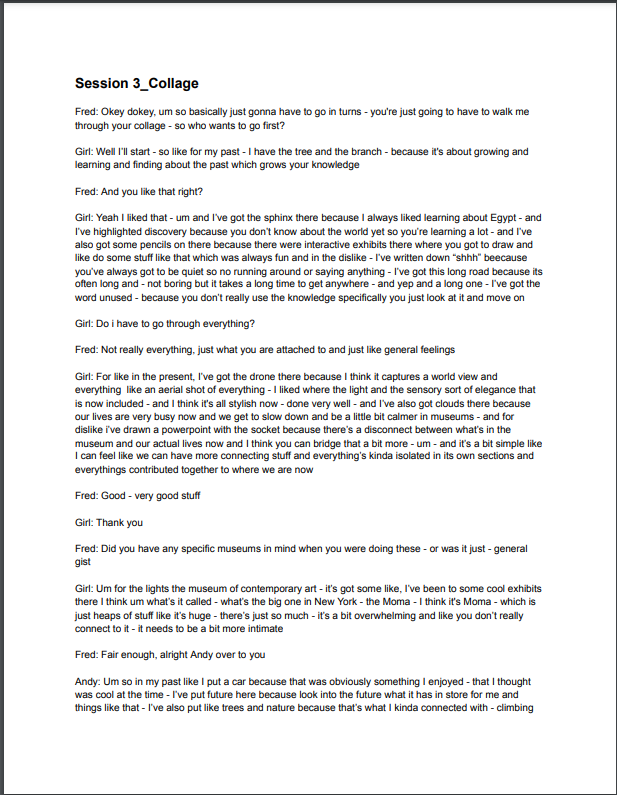
In being able to analyse the data via using a rigorous approach of statement cards in a similar vein to affinity diagramming - we were able to clearly gain insights and meaningful data that was later represented in a research visualisation in showing these relationships
The analysing process involved a process of learning to do statement cards which acted similar to affinity diagramming however were an extra level or rigorous process in helping to gain further insights and details from the very insightful and interesting details that were provided by the 12 participants during the context-mapping sessions which encouraged this through interactive and hands-on activity making. Transcriptions for these interviews were also done in the process of making these statement cards.
A research visualisation was also made in representing these findings found from the analysis - to visually represent them in an appealing and more visually memorable manner as well
The statement cards and research visualisation can be seen further below:
.jpg)
Statement cards from interview transcriptions
%20(1)-1.png)
Research visualisation in A3 portrait format
After splitting up into groups of two - me and my partner further narrowed the scope of our project into focusing on the main research statement that "time equals value" and the research phrase of "experiencing a breath in an eternity" to express these values
The scope was narrowed through the assistance of the research visualisation done in the research stages which helps to draw out the key insights and findings from the research and user data we did with group context mapping activities which probed them in discussing meaningful and interesting insights from doing this.
In short: the scope was focused on the two themes of "memorability" and "sustained engagement" - two areas to which were the main focus and drive throughout this design project and as a result the design vision of "time = value" was made as we discovered that whilst people can have the false pretence of impression of learning something by aimlessly walking around in a museum - they will no genuinely be able to appreciate and slow down in appreciating what makes an artefact valuable or insightful to them in a museum full of history and nuance.
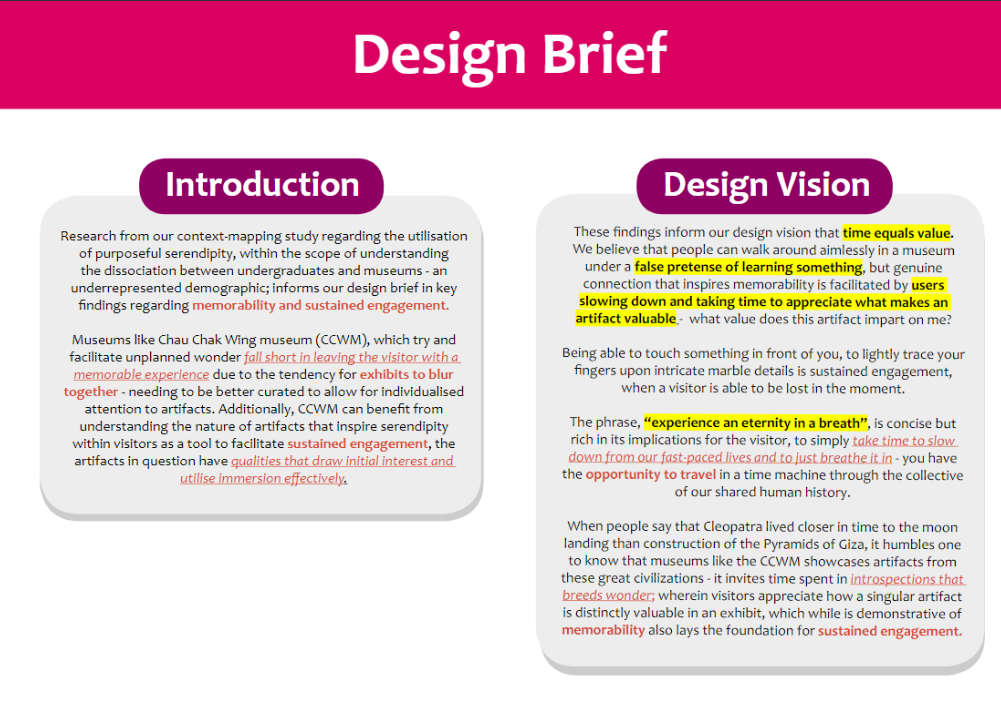
Narrowed scope for design project as shown above
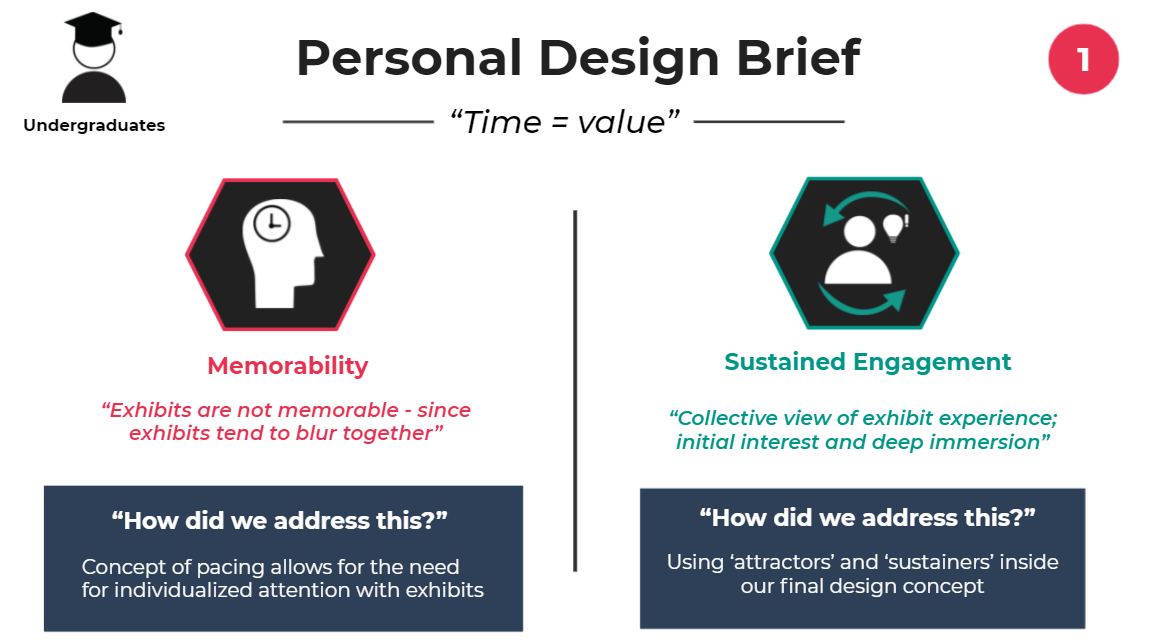
The key themes of memorability and sustained engagement
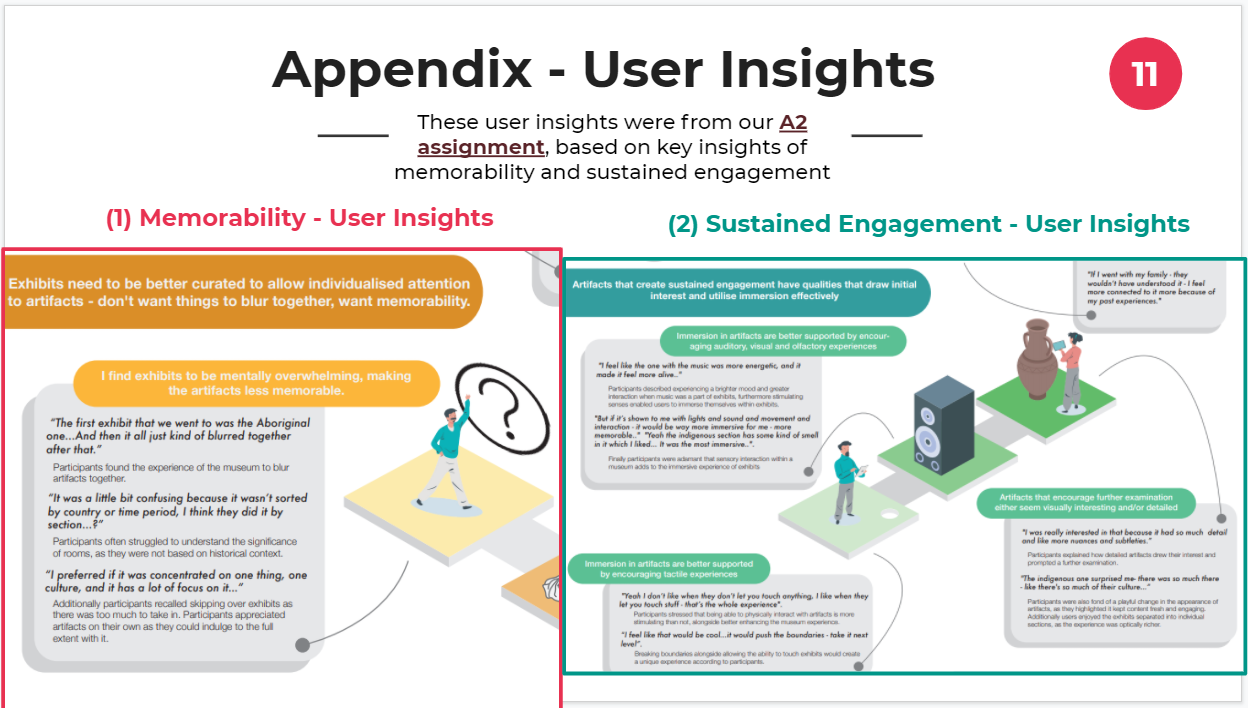
The two main themes taken from the research stages
The ideation process was rigourous and pretty complex and confusing for me and my partner who had created multiple different ideas and adapt various different aspects that we created from discussion and an extensive look on secondary research - to be able to move on and create our final unique solultion
This process was one of the longest and critical thinking one compared to others as me and my partner had thought long and hard about an ideal idea following the creation of ideas that were subpar or not unique enough and replicating other features from similar apps. In the end however - we were able to get through this process and come up with a final idea - which is explained in the next section. However some of the iteration ideas which were created and dismissed will be explained (through this similarly design squiggle process)
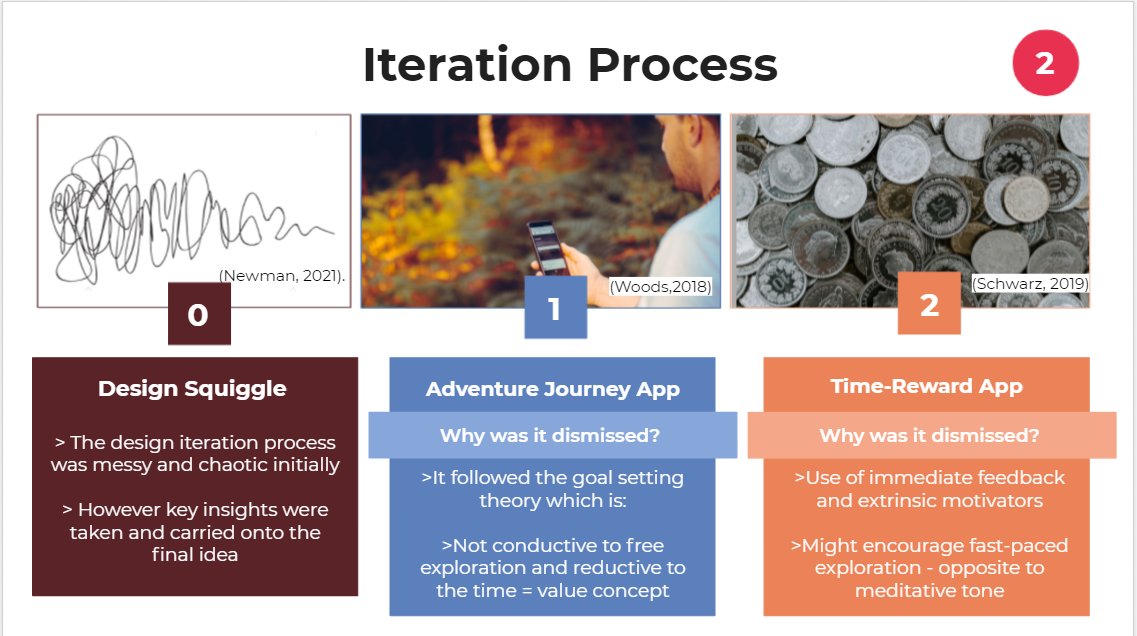
Iteration ideas with dismission reasons
This idea focused on having the user follow their own self-driven adventure via having multiple random images that they select which then allows the app to map out the different artefacts or exhibits that aligning with the images chosen by the user. Whilst this idea was quite interesting - it did not allow for free exploration and rather diminished the valuable and warming concept that time = value in reducing it into a simple way finder application which is something that we felt didn't bring the concept to justice and was already done before in the design landscape.
This 2nd idea focused on a more refined idea incorporating a wristband technology or sensor technology that detected the user's movement when it came to how close they were next to an artifact - to indicate that they have taken the time to observe it and look into it. They are also able to gain points or a money currency in being able to spend more time with these artifacts - accumulating passive income as they begin doing so.
This idea was dismissed however due to the use of extrinsic motivators which conflicted with the idea of time = value, a statement which draws testament to being more slowed and calming rather than fast and abrasive which this idea had encouraged. Due to this reasoning - it was dismissed however adapted later on in the final idea or solution.
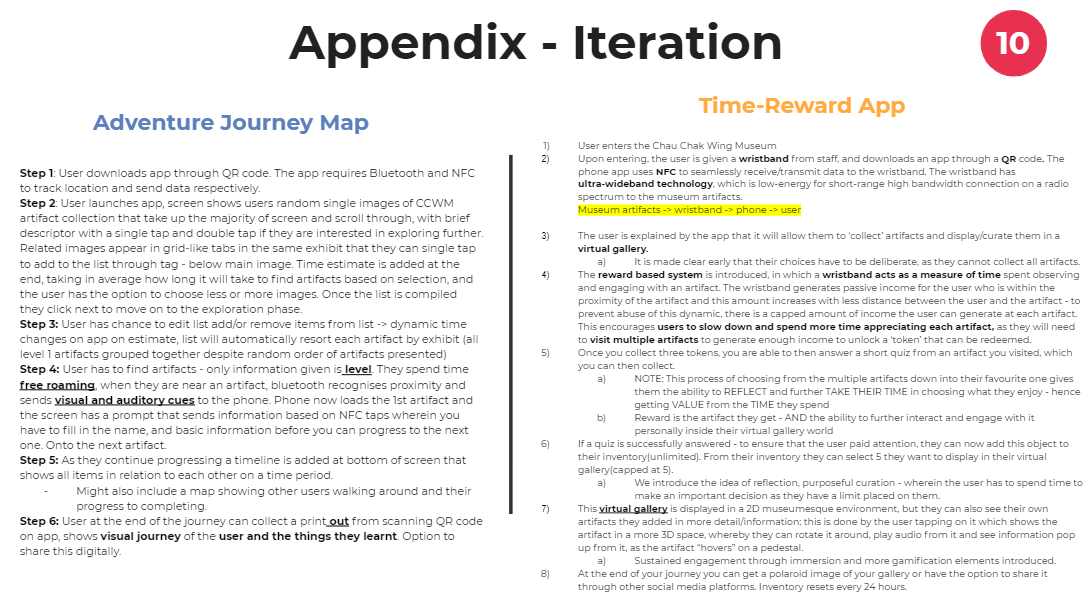
Description of the two ideas in a step-by-step format
After a long complex and confusing iteration process - we were able to develop and create a final prototype solution that was represented through a video prototype clearly explaining how the different interactions and aspects of it worked alongside creating a User Journey Map in detailing the process of it through the eyes of various personas created in previous stages. A prototype solution we called "Lost in Time"
Following the ideation process done - the final prototype idea [NOTE: This idea wasn't designed as a final product - rather it acted as a final prototype design] combining the use of phone and wristband technology (using ultrawideband waves in particular) were used in combination in order to provide a digital interface app that a person interacts with - and a wristband to track the motion and sensor near an artefact in particular.
Combining these two allowed for the user to be not only engaged throughout the process in interacting with the artefacts they are personally interested in - but also helps in the memorability factor - by incorporating a virtual gallery inside as well (all these steps are shown concisely and presented well within the video prototype).
In the process of the final solution - a user journey map detailing the steps of different personas in interacting with the design was made alongside a video prototype showcasing a more visual and narrated process through it.
The final solution was an adaptation of the time reward app whereby instead of incorporating the money currency shop feature or encouraging the extrinsic motivator of a currency type - we had instead facilitated for replaced it with a puzzle piece of the artefact the person is engaging with - with more pieces of the artefact being shown as they spend more time observing it or being in the range of it (determined by the ultrawideband wristband the user has or is given as they enter the museum by a staff member).
In doing this - it helps to encourage more interest with these artefacts and exhibit at the user's own self-interest which then leads to them being able to pick 5 specific artefacts they like after they choose to detach the wristband and add them to their own "virtual gallery" where they can see them all and interact with them in a more 3D and immersive level.
These steps can be seen further in the user journey map and video prototype below - however building a baseline for this final solution helped combine our themes of memorability and sustained engagement in a unique manner - incorporating not only phone technology into it, but also motion range into it as well (accounting for the user's proximity or location near an artefact).
The user journey map below demonstrates how a typical user of the final idea prototype (described above) would interact with it in a museum context - from start, middle and end (throughout the entire process).
Three personas were also used to demonstrate the distinctive emotions and experiences of them, all of which were extracted from the details and intricacies of the interviewees from our research as well.
.png)
Showcasing the experiences of the various personas with our solution
The video prototype shows in a more visual manner, the process and steps the particular persona - Bored Jason, experiences throughout the museum.
This video prototype acts as an extension of the user journey map above in essence.
Video prototyping showcasing design created in a museum setting
The following images show various different snippets detailing our final solution design such as the features that were involved with the design alongside how the themes of memorability and sustained engagement related back to our final design concept as well.
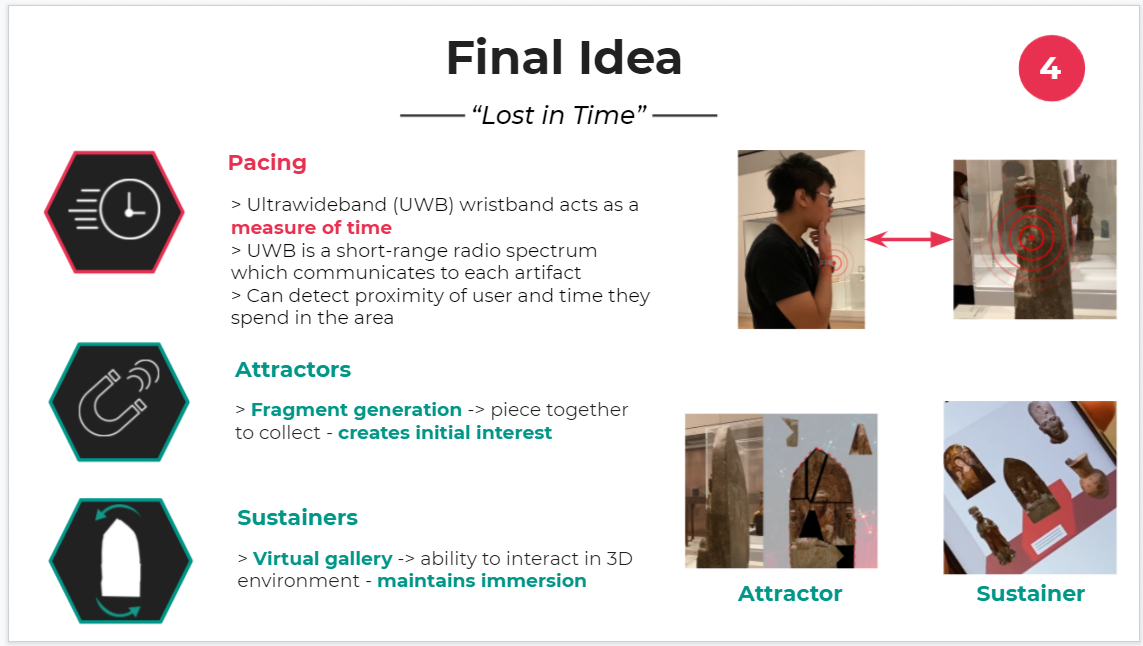
Elements of final idea taken from scope research
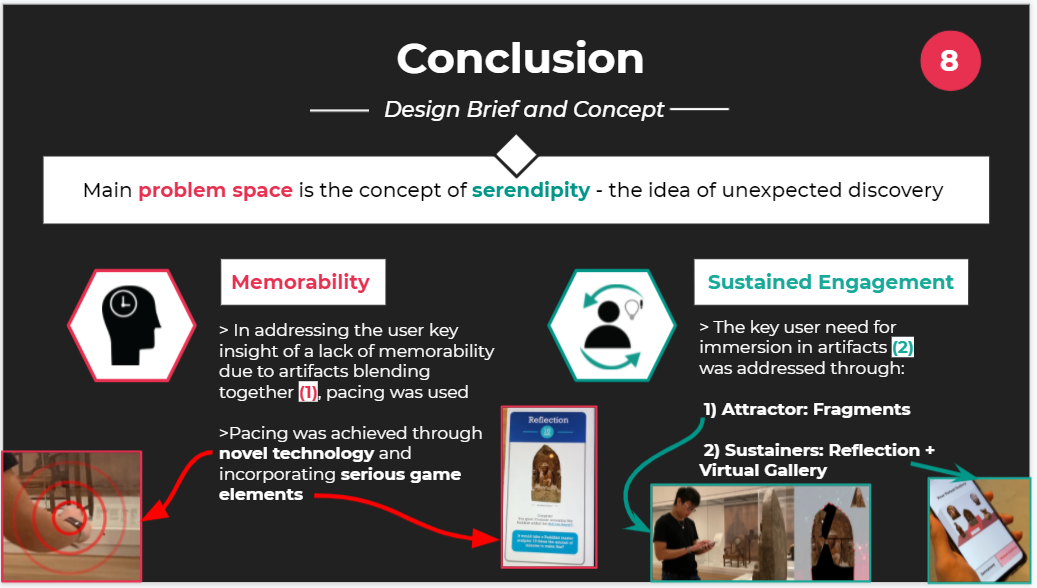
How the final idea fit inside the problem space of serendipity
This section will detail my own personal experience with the project as well as some learnings or aspects to keep in mind following the completion of this project over a 12 week rigorous and tough process which all in the end landed pretty well with a unique design
Overall the project was a rocky roller-coaster of emotions and experiences with experiences of downtime and experiences of being able to understand and salvage everything together, however in the end it was worth it with a unique design being created that was something that took at least 2-3 good iterations and time to establish and thoroughly design and relate back from a user point of view, alongside the design brief designed as well.

Moments of ups and downs throughout the design project
The learnings I mainly took from it were to:
Making a website solution in addressing student study habits
Developing a web application focused on increasing productivity during study sessions
The problem space for this website project was based on a factual yet realistic design brief on how DesCo - a client - has found a "gap in the market for a platform which focuses on managing individual study sessions" and they require a web-based application that uses planning and content functionality in being able to enhance a student's study session in being productive and efficient.
The design brief also suggested to hone in on a specific sub-group of students that would benefit the most from the proposed web-based application to which is more explored and detailed in the "Research" process.
There were certain requirements from DesCo which needed to be addressed before going through a detailed process in further understanding and researching the problem throughout this project development.
These included features such as:
Alongside technical requirements consisting of:
The process and according steps followed in understanding, developing and overall creating the final website application design
The process which followed through developing this web application included:

Process image
The research conducted mainly on the target audience in gaining a more narrowed scope and understanding of needs to be addressed
A good understanding of the intended target audience and the personas created which followed - was essential in understanding the certain needs and requirements of the target audience - to which whilst based on students, was narrowed down to university students because of how:
Both of these justifications were based on two sources - one from "thegooduniversityguide" and another from Deakin University.
Upon doing further research on university students based on news articles, research paper sources and also using a bit of Reddit to gain a more student perspective of things.
There were three main personas created following the online ethnography research done. These included:
All of these personas whilst diverse - had been situated and under the common scope of being university students with each of these personas having different needs and requirements which would help transfer into framing these requirements around the features required from DesCo (from the "Introduction" section).
These persona requirements will also help further in the development of the website look and design (further seen in the "Iteration" section) as well.
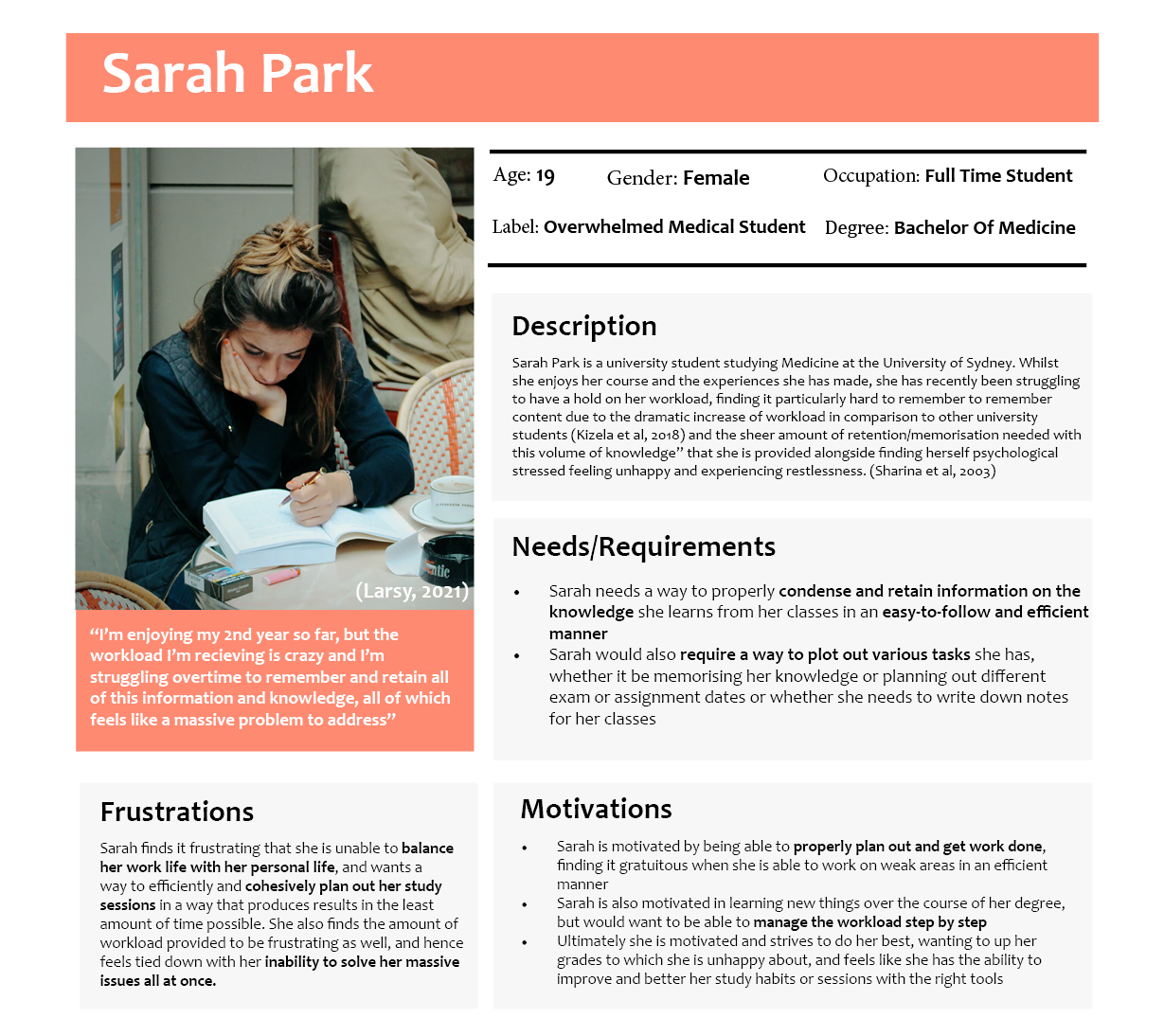
Persona #1 - Overwhelmed Medical Student
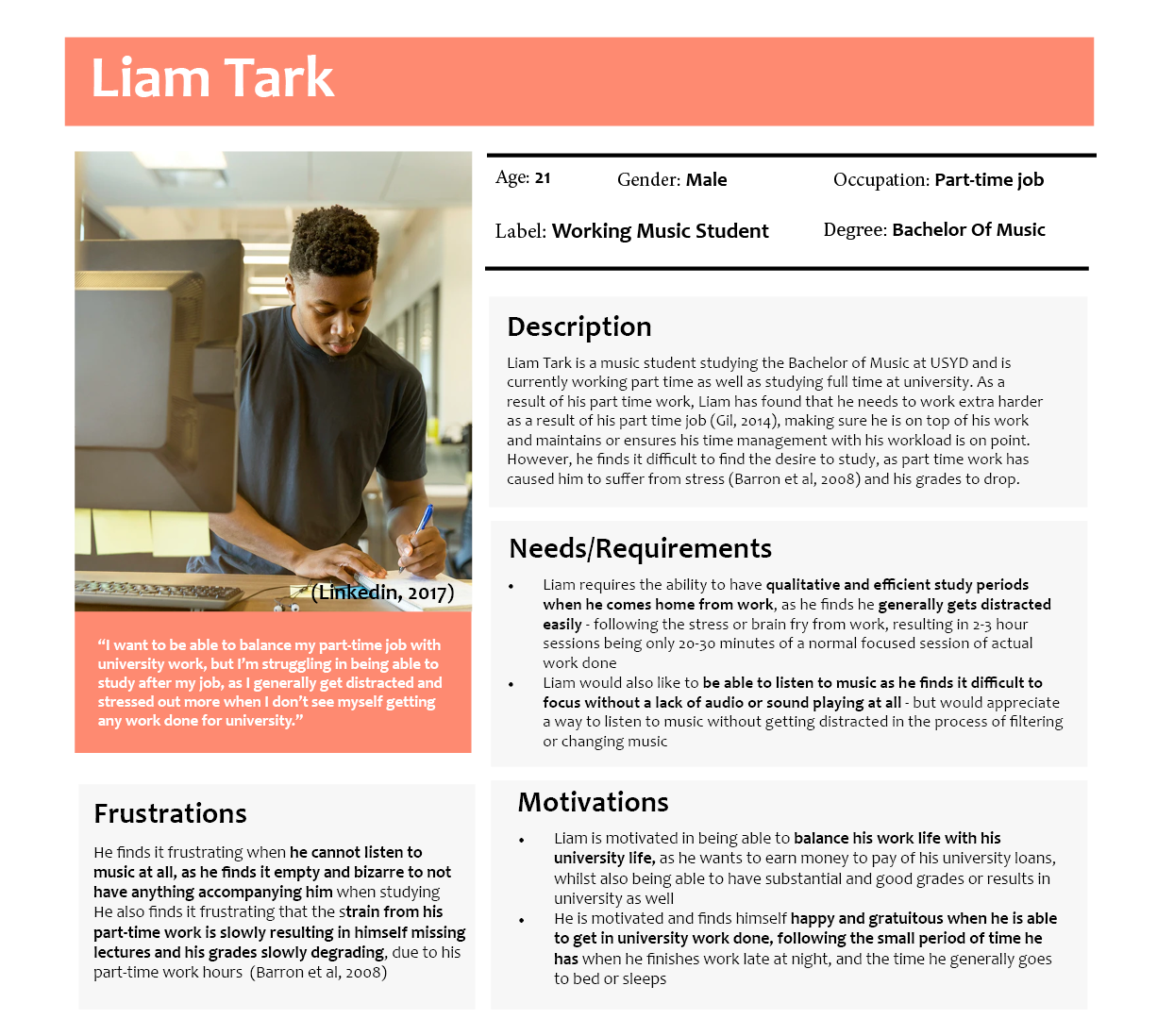
Persona #2 - Working Music Student
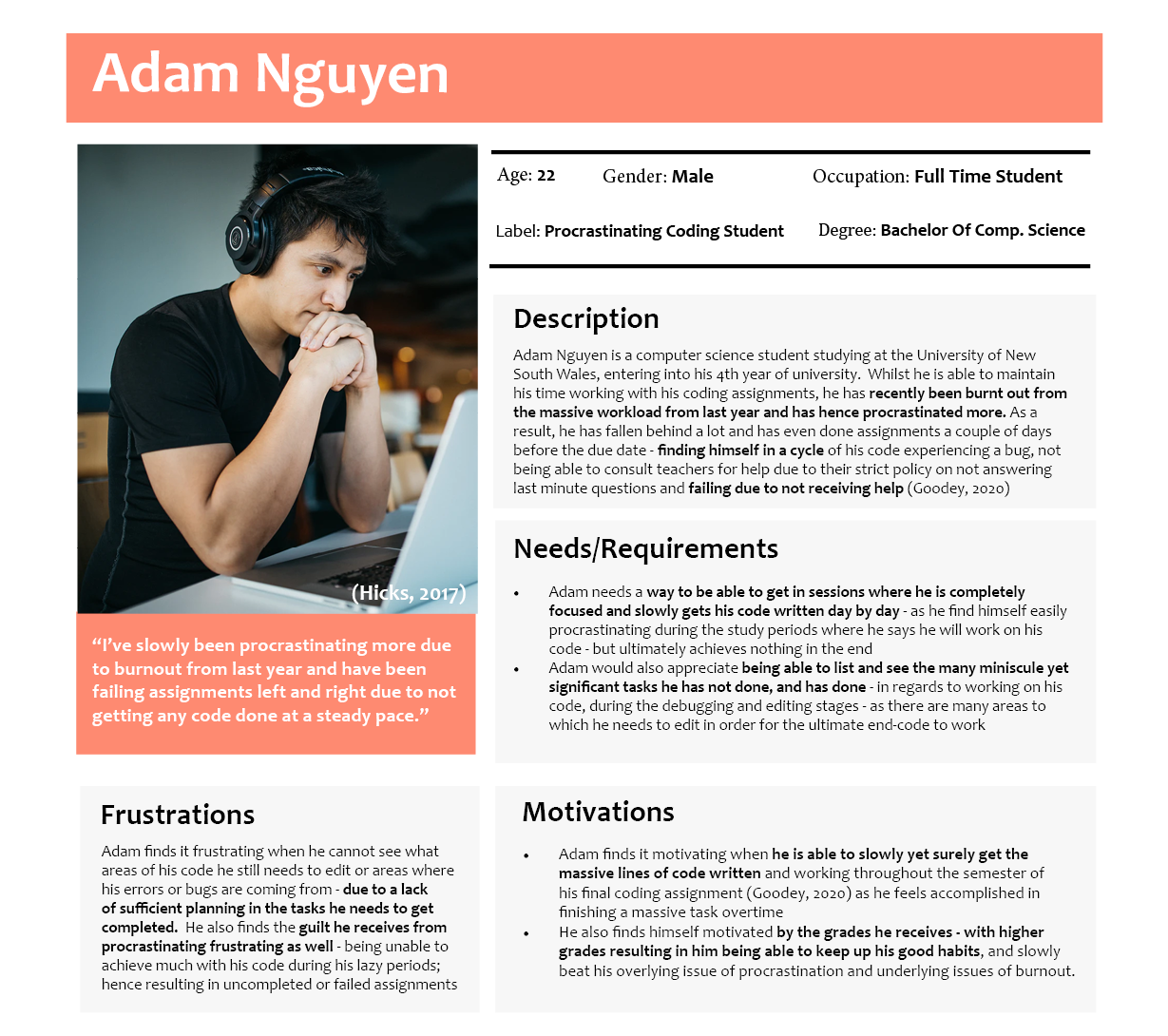
Persona #3 - Procrastinating Coding Student
Iterations in the form of sketches, wireframes and mockups in visually seeing the overall website layout and visual design
Following doing proper research on the target audience and the according personas - iterations of ideas were done in the form of sketches which was further developed into wireframes and finally into mock-ups.
These ideas focused mainly on the design and format of the overall website application alongside the other multiple pages of interaction with the website.
There were three main ideas (chosen from around 6-7 other ideas) which were chosen and deduced further into one main idea - with the justification of it described more below.
The main three ideas consisted of:
More of the idea details can be seen in the images below:
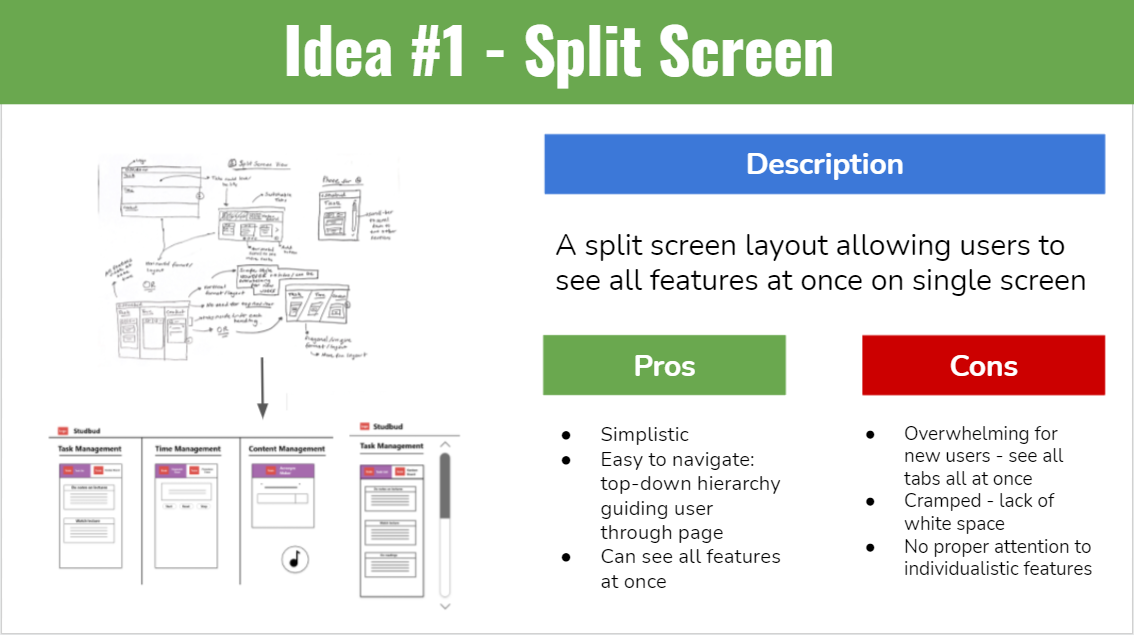
Idea #1
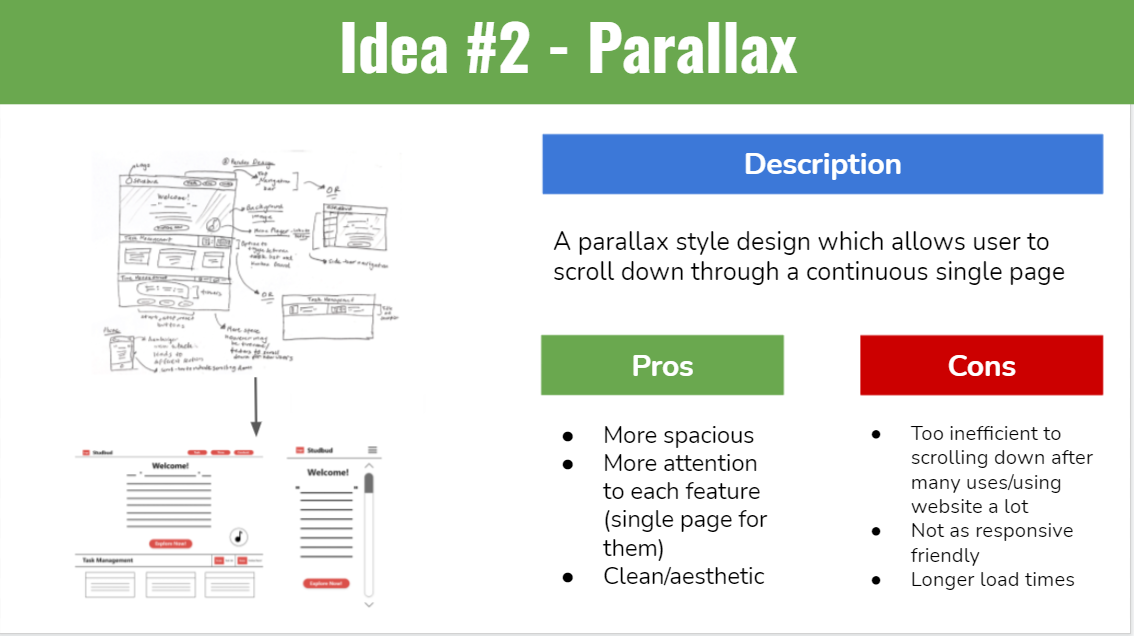
Idea #2
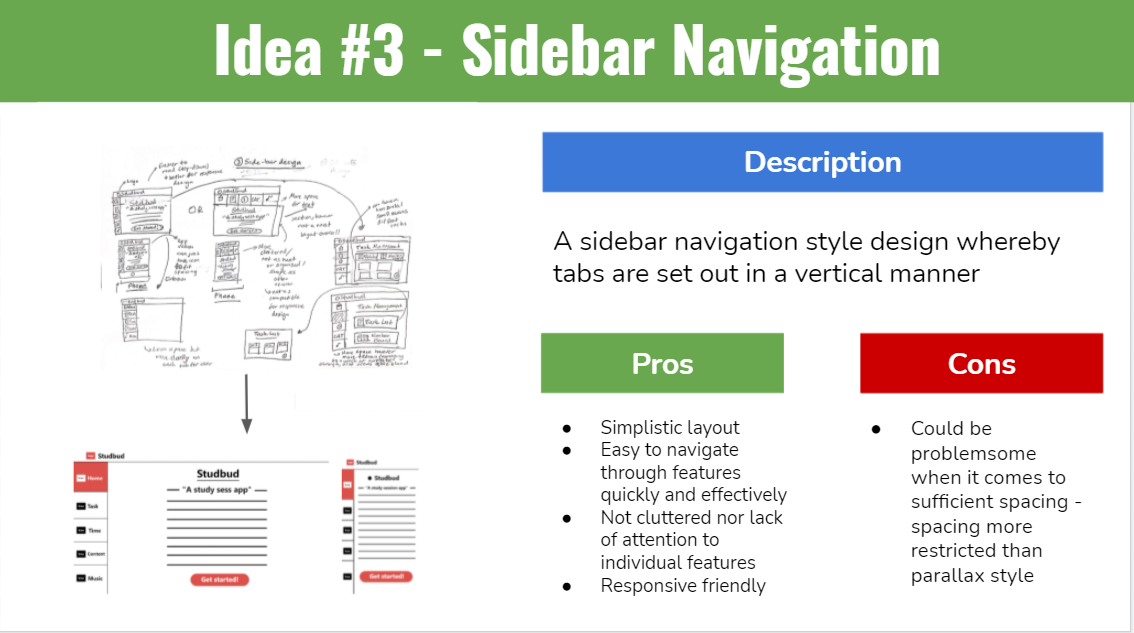
Idea #3
In the end out of all those three ideas, the third idea was chosen as it was:
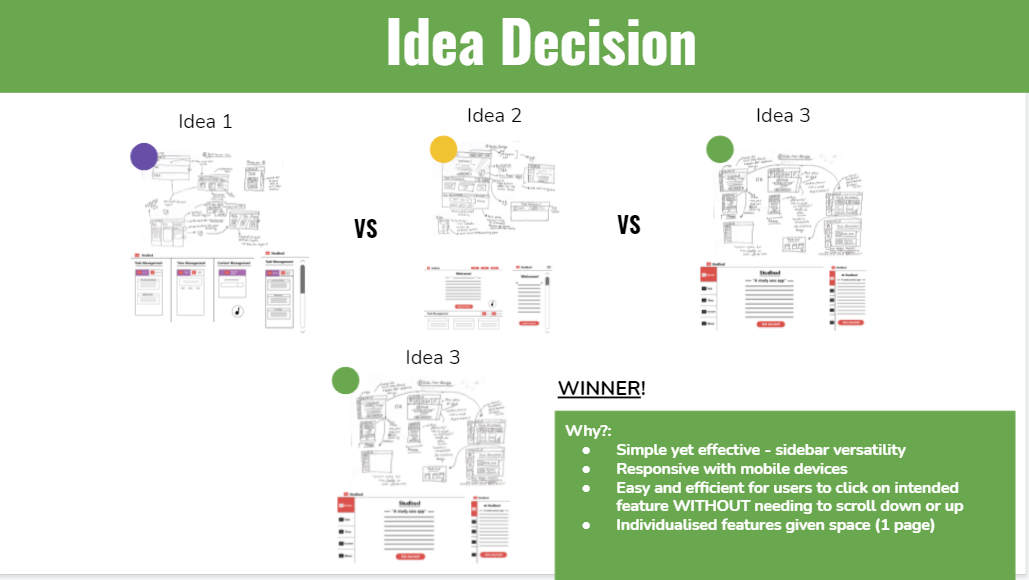
Decision Making
Mockup designs for further made and developed for the 3rd idea - following a simplistic yet modern colour palette alongside an easy to navigate website
Slideshow of mockup designs created
(NOTE: Find a way to do responsive design for this,
doesn't seem to be working well on mobile devices)
Outlining the required specifications needed to be done throughout the 5-week process of creating the website application
Following the research and iteration processes - a functional specification timeline graph was created as a way to hone down and know specifically which areas of the website application should be done in what time period - and how long each of them should be done by. Note that this was the most ideal and organised method of approaching the development of this website in the span of 5 weeks and as discussed more in the "Conclusion" section - time management wasn't the best when it came to this project however it was a good lesson as to how important organising time management is.
The functional specification timeline can be seen below:
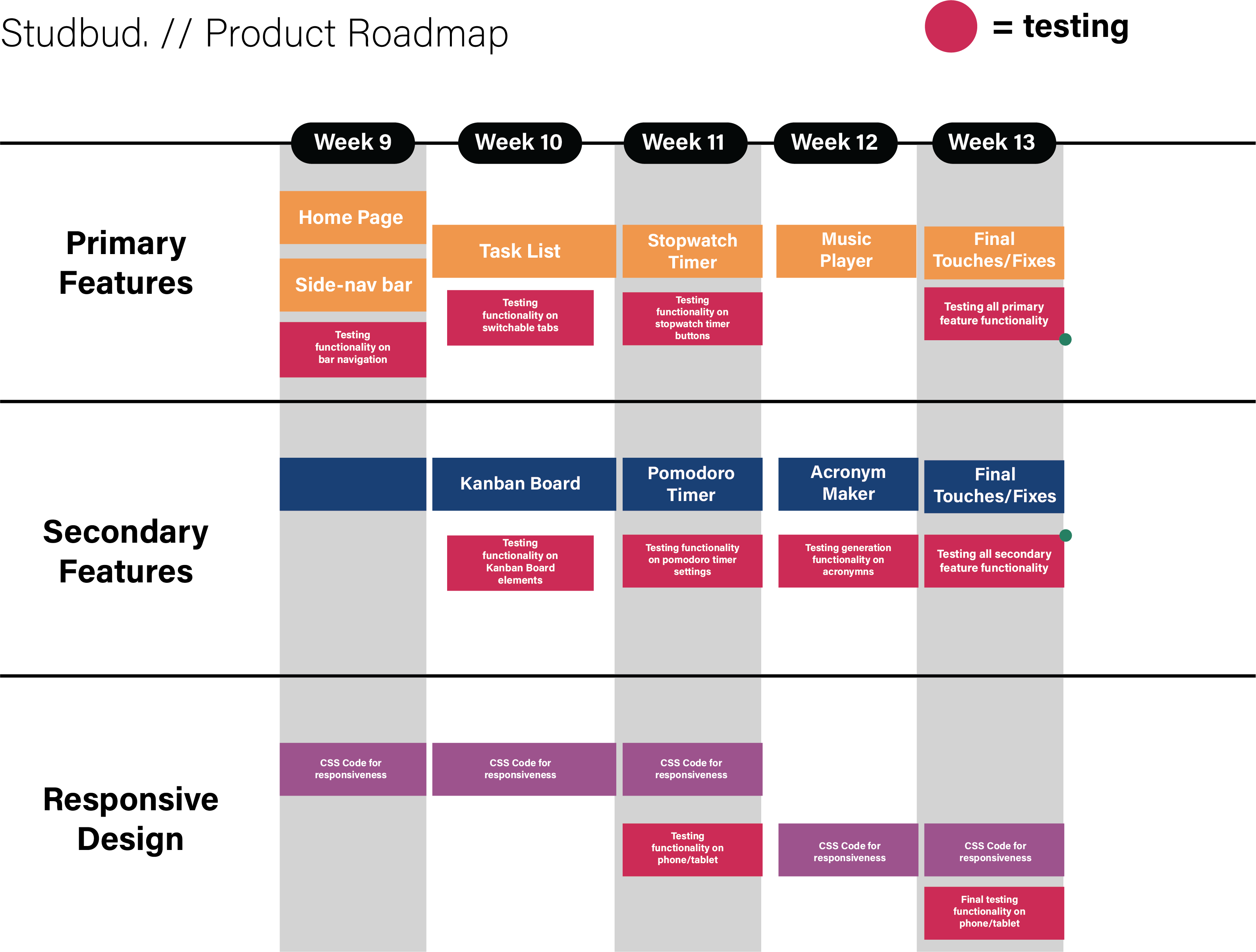
Timeline of required specifications within a 5 week time frame
The overall website creation process involved, a look into the final website design, alongside changes made due to time management and difficulty issues and making sure the website follows the requirements from Studbud described in "The Process"
The website creation process was strenuous as I began coding my website in the process of 4-5 weeks with the most notable problems being finding code or a way to code the Pomodoro timer as I found it hard to think of a way to do so or I overcomplicated the process of doing so as well as responsive design - whereby I had improved from before hand and it was quite responsive however there is something I'm missing that makes me just strongly dislike doing responsive design; these issues being discussed more in the learnings section however.
Some of the new things I did this time around with my website creation process was using Visual Studio to code in order to link with a database system as well as using JavaScript frameworks or modules for my Kanban Board alongside working more with JavaScript which is new for me. I also used the Spotify API as well in replacement of the music player which worked and integrated well.
These things and new additions to my typical website process can be seen further below:
Website Creation
A slideshow of the new and optimised look at the final website with images and descriptions of why things changed alongside a look into the code as well can be further seen below:
Final Website Design Slideshow Reel
The process throughout this website project was insightful and interesting as I was able to leverage my skills in HTML, CSS and JS in creating a relevant web application targeted for study sessions within university students
Overall, whilst I had struggled with coding some of the features using Javascript such as the Pomodoro Timer which I struggled trying to adapt code and understand code from - I was happy to learn about incorporating all elements of HTML, CSS and Javascript in creating this web application which would potentially help university students in their study session. I was also happy in the cohesiveness of the process from research to iteration and to website development which was thanks to my better time management and understanding what particular aspects or requirements are needed.

Conclusion
Some learnings from this website would be potentially working on CSS responsiveness design which is always a problem for me when coding websites since I found myself struggling in fitting my website into being responsive for mobile and tablet versions.
I also noticed that my code potentially should have been more efficient alongside better learning how to use Visual Studio as well to fix some usability or technical problems. I was happy in learning how to dynamically link to other libraries or modules such as for the Kanban Board using jKanban to properly work it within my website which saved a lot of time and potential effort when it comes to using the Kanban Board functionality (which might have been very hard to code).

Learnings
Developing a potential solution in addressing student study motivation
The problem focused on solving the relationship between online learning and a student’s study motivation during COVID-19 by proposing a design solution catered to it
The problem space for this project focused on discovering the relationship between how online learning during COVID-19 affected a student's study motivation - and with the findings and research found from these discoveries, proposing a solution that catered to the user needs and requirements within the scope of the project.
This was done accordingly in the process of 12 weeks, with a more defined process being seen below
The process and according steps followed in understanding, developing and overall creating a final design solution
The process for this project consist of:
Process with according procedures and tasks
The research conducted mainly on the target audience in gaining a more narrowed scope and understanding of needs to be addressed
For the main portion of the research - a research triangulation methodology (three methods including online ethnography, interviews and questionnaires) was used in order to gain the most understanding towards the design problem and what followed was the creation of personas that were gathered from the findings from the research triangulation methods alongside additional research as a means to gain inspiration from other business companies and agencies projects and designs as a means to begin branching out ideas on what other possible features would be necessary for my target audience of university students
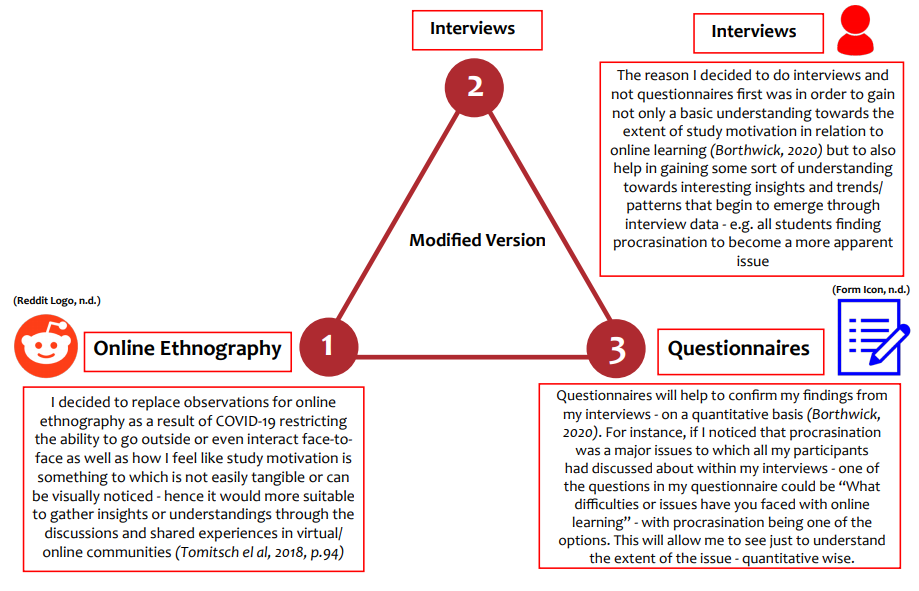
Research Triangulation Methodology
The first step of the triangulation method was online ethnography which was conducted by looking into what other people have said about their experience or responses to studying online during COVID-19 as a means to gather information on the potential effects it can have on a student's motivation or areas related to it.
The research insights can be seen below:
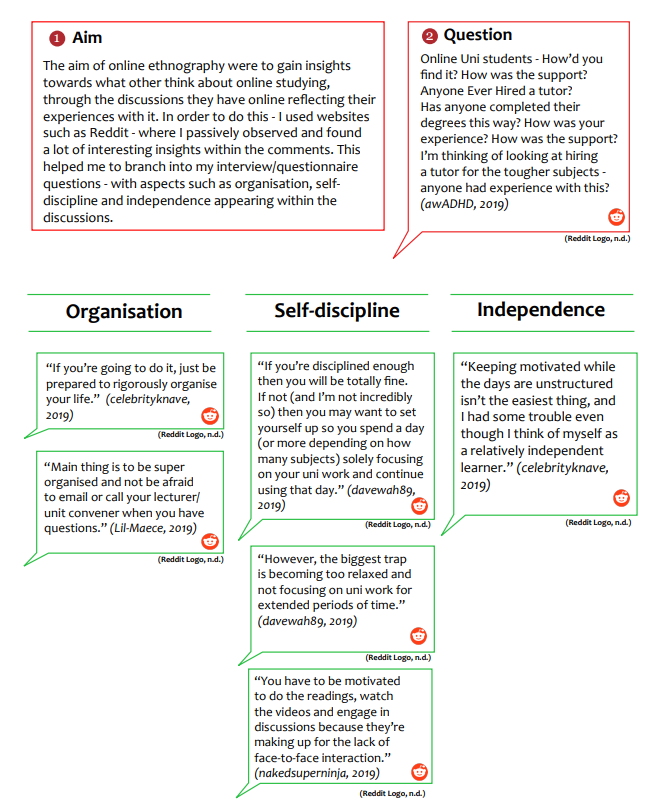
Online Ethnography
After conducting research from my online ethnography - interviews then followed as I interviewed 6 participants, asking them 10 main questions to which was successful in gaining information and useful insights on their experience with online learning during COVID-19 and how online learning impacted their motivation alongside other aspects such as productivity and so on.
A summary of the interview demographic and insights can be seen further below:
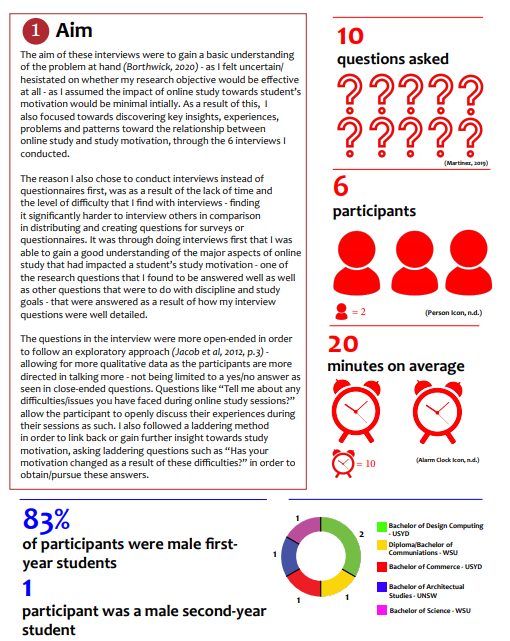
Interviews Demographics
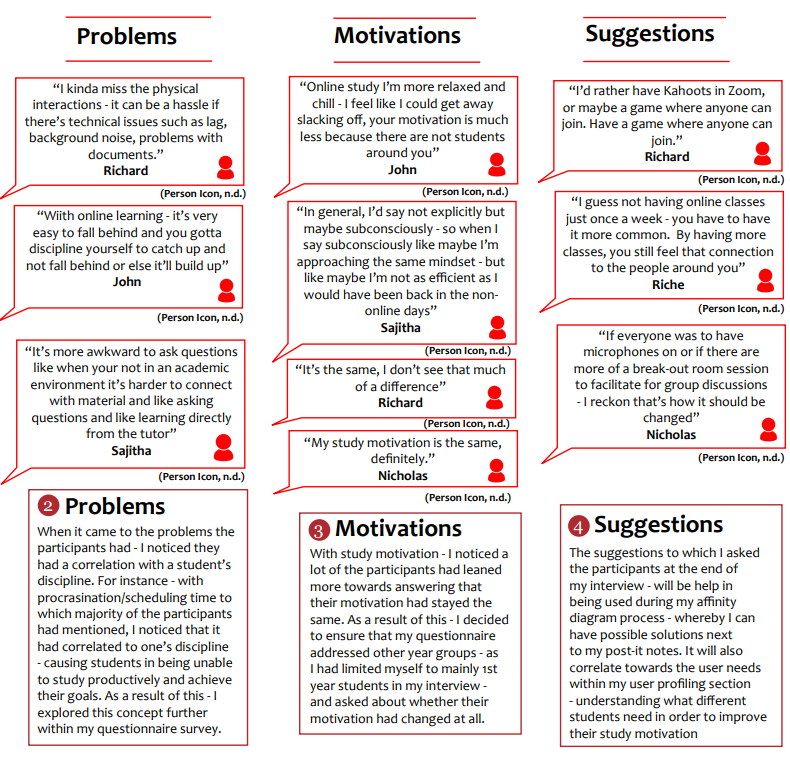
Interview Insights
Gaining proper information and insight from my interviews done helped develop potential questions that tapped into problem areas such as procrastination, discipline, time management and interaction - areas which were further supported by the sample size I was able to gather with my questionnaires (getting a total of 30 participants from contacting fellow peers alongside posting on Reddit, ensuring that the data used from the survey was anonymous and kept private alongside secure).
The findings from my survey can be seen below:
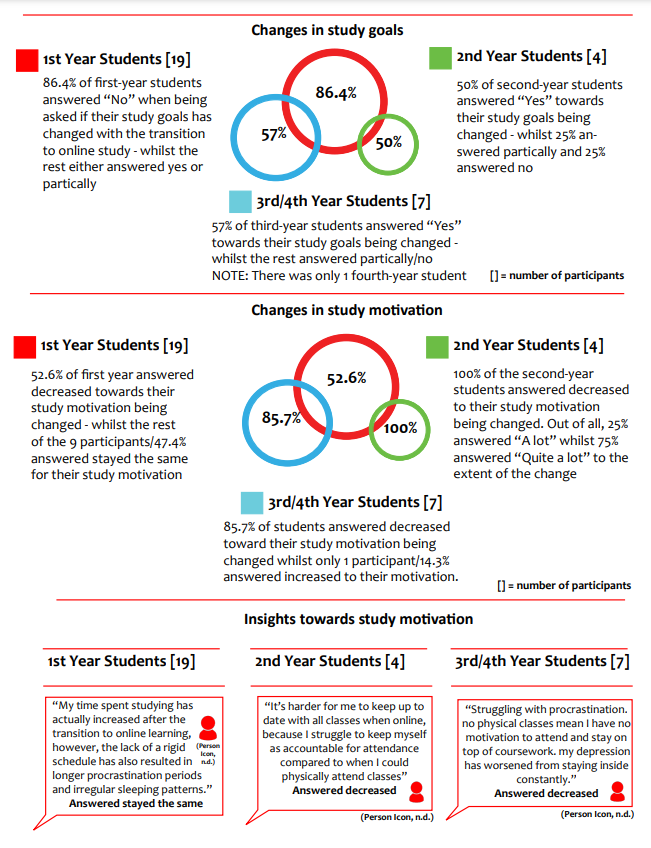
Questionnaire Findings
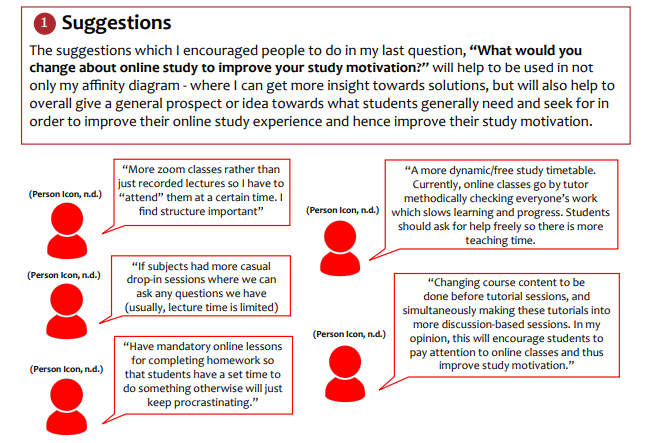
Questionnaire User Suggestions
Two main personas were made following the research conducted - and these personas were mainly extracted from the interview, questionnaire and affinity diagramming done - with the two being divided from the first year students and the other from 2nd, 3rd and 4th year university students.
These personas can be seen further below:
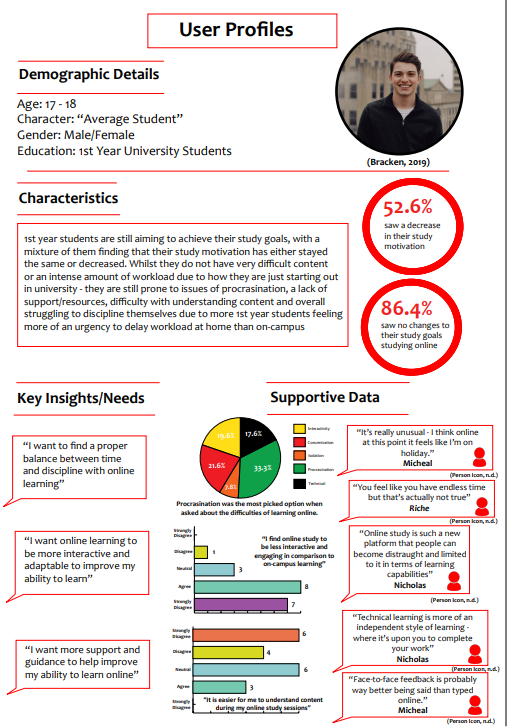
Persona #1
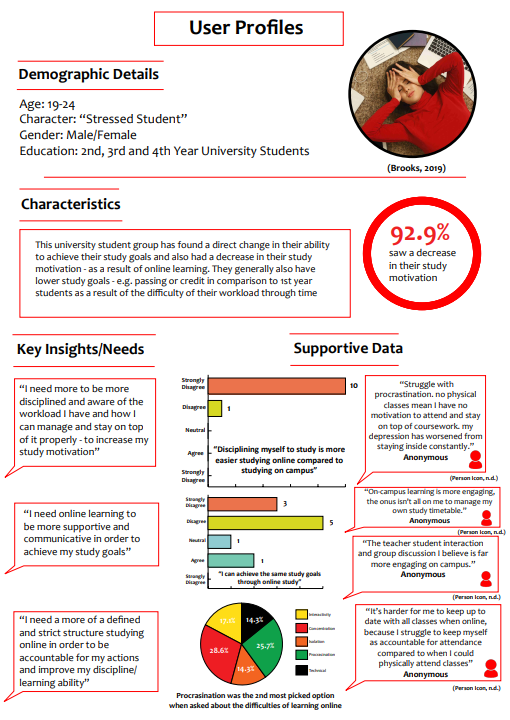
Persona #2
After gaining primary research and insights from online ethnography, interviews and surveys - secondary research was conducted through not only taking a look through literature online but also through looking at design precedents that acted as a way to gain insight towards past designs that addressed issues around study motivation - including discipline and time management.
Below are the insights found:
.png)
Design Precedents
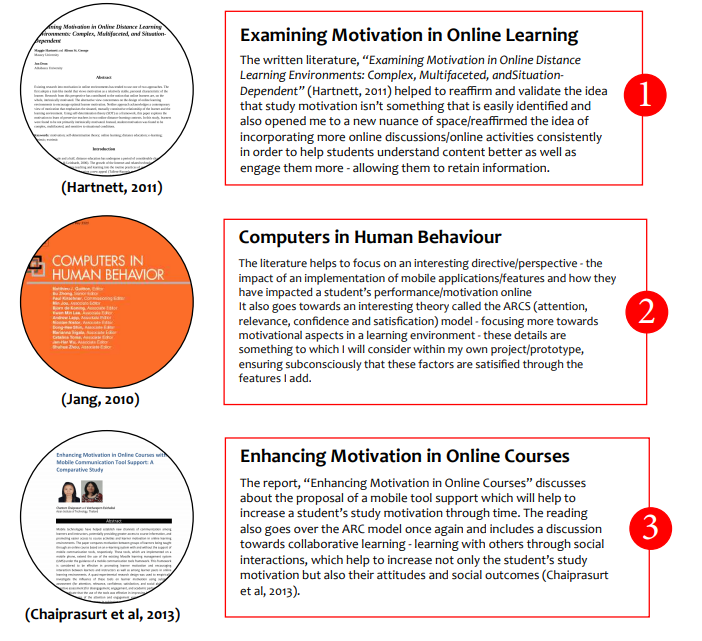
LIterature
The process of properly analysing and synthesising the data from the research into being able to see common key insights, themes and issues to be considered
Following the research done - it was necessary to clunk the massive amount of data from participants and surveys in organised, analysed and synthesised information that was useful in detailing the user needs and insights. The main method that was used for this was affinity diagramming and from this diagramming I was able to make a summary of the necessary user needs to keep in mind, before properly ideating, prototyping and testing my final concept.
Below is the affinity diagram done alongside the summary of user insights and needs found:
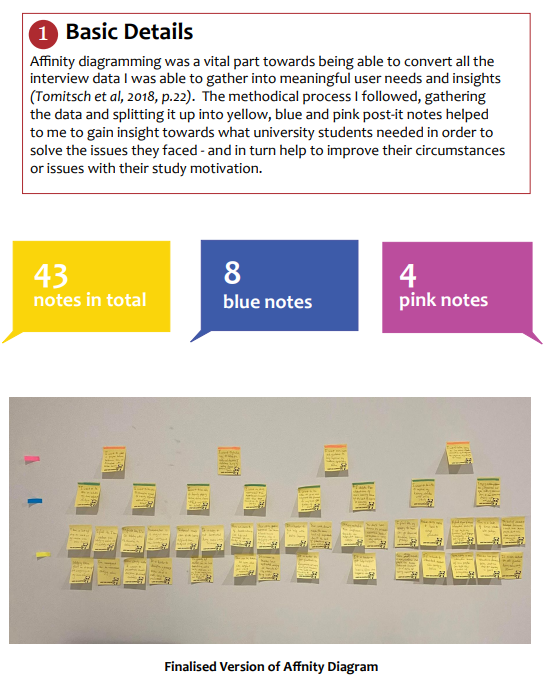
Affinity Diagram
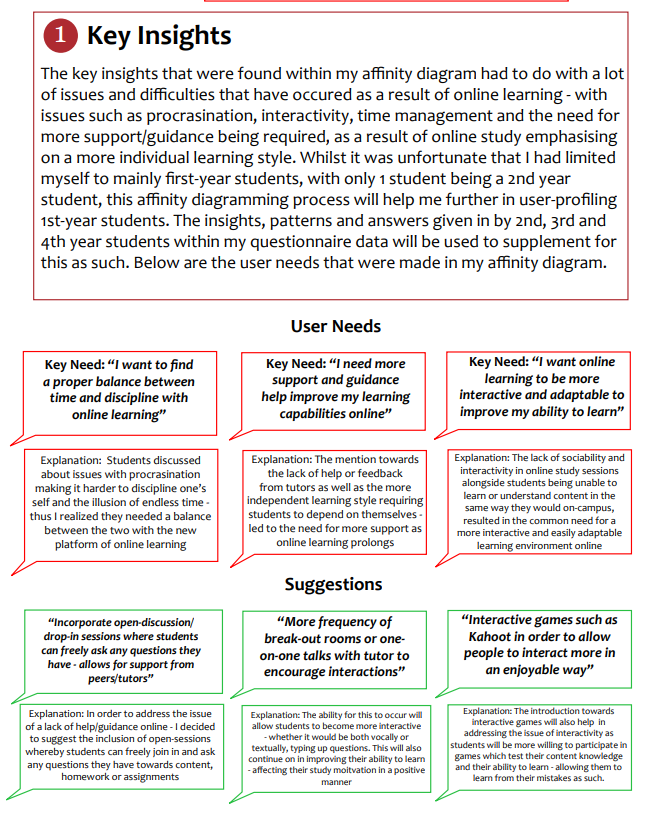
Key Insights Found
Following a proper extensive research and data analysis stage - iterations were done in helping to create as many unique, distinctive and different ideas that can be used in helping address the issues and insights raised from the research stage
Following extensive primary and secondary research done, iterations for potential ideas came through - as I continued to generate as many ideas as possible as a means of gaining a more open ended mindset for exploratory concepts to come, instead of just coming up with a very good singular idea and going through there. Instead multiple ideas were made through methods such as brainstorming, forced association and reframing.
A summary image of the ideation process is seen below:
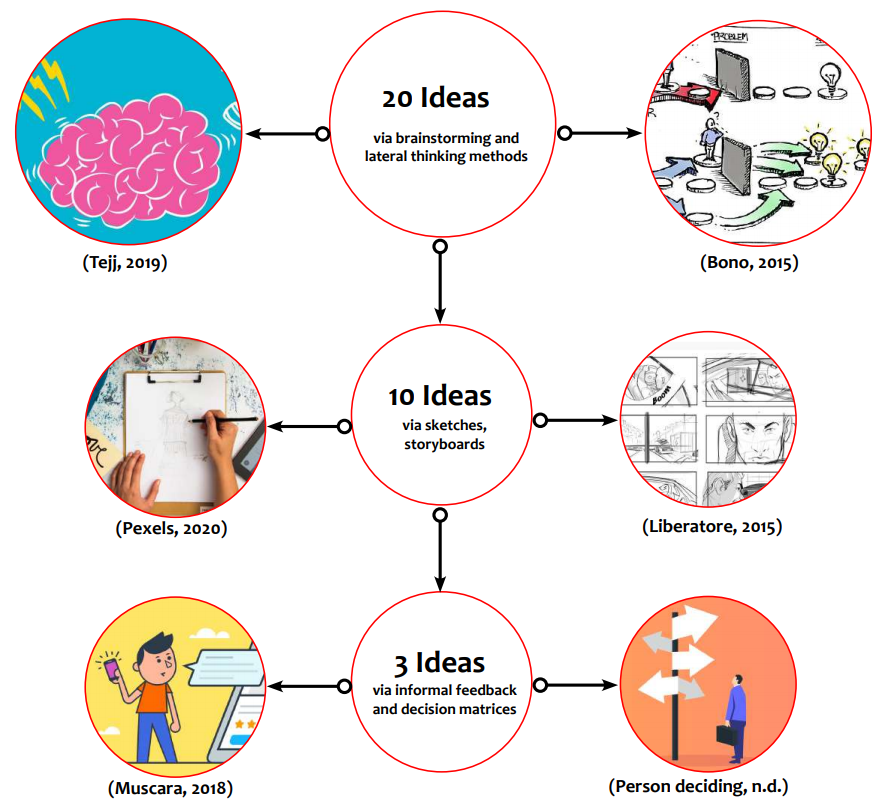
Iteration
The initial ideas created accumulated to a total of 15 design concepts thanks to being able to brainstorm and branch out more on the details of these ideas. Being able to branch out to different technologies helped to break out of the chains of thinking exclusively of just websites and mobile apps but also other technologies such as augmented reality and digital glasses. This allowed for a more divergent array of options, focusing on targeting areas such as discipline, interactivity and time management.
Below are the ideas generated from the brainstorm:
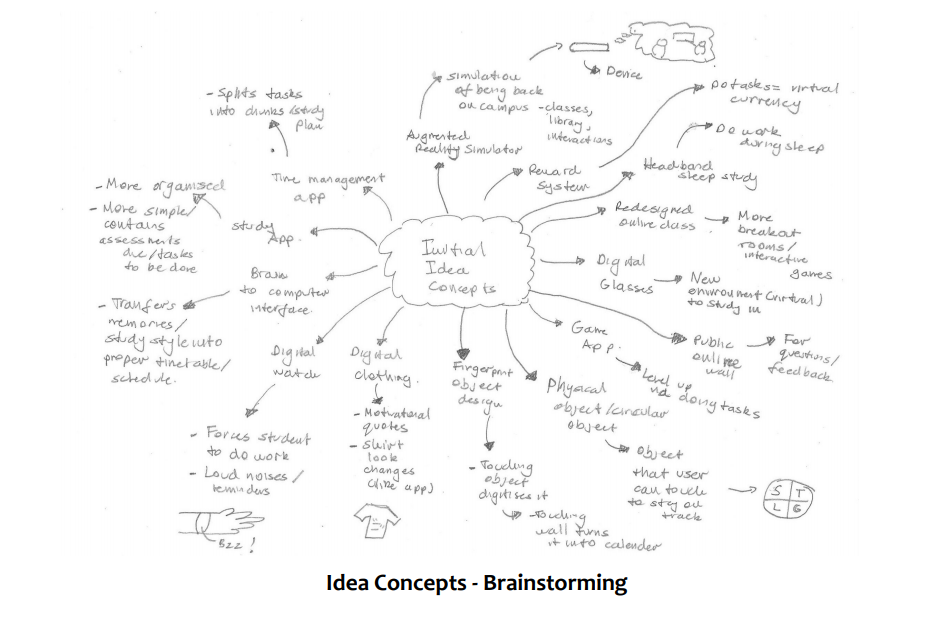
Initial Ideas
After being able to condense a total of 20 of my ideas into only 10 main ideas/concepts which addressed the user needs and insights - I drew sketches for each of these 10 ideas (Appendix 2) and distributed it to a couple of users for some informal feedback as well as asking them about why they liked the idea they chose out of all the sets.
Below are some of the insights and feedback to which I received:
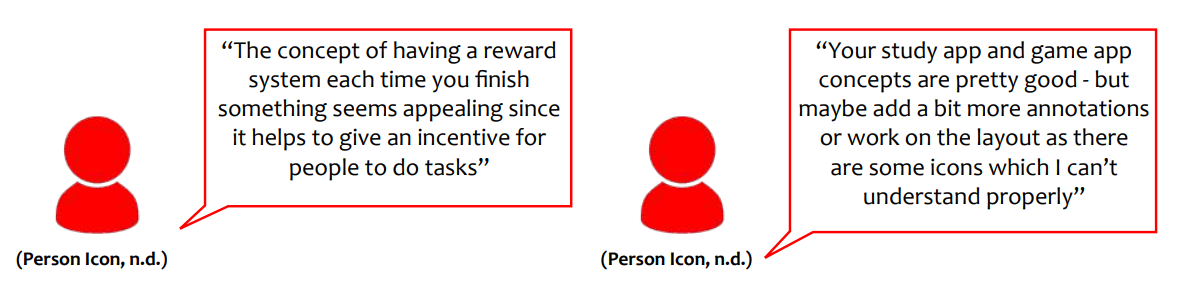
Informal Feedback
The decision matrices I used helped to further condense my 4-10 ideas into the best and most suitable 2-3 ideas based on different criteria and scoring points to which were accumulated. A scale of -3 being the absolute lowest and 3 being the absolute highest was used to score the design in relevance to it’s criteria.
In the end - I realised that the study app, game app and water bottle website design were the 3 best suited ideas - addressing multiple elements in regards to interactivity, self-discipline and support/guidance online, alongside all having a digital element as well
These results can be seen below:
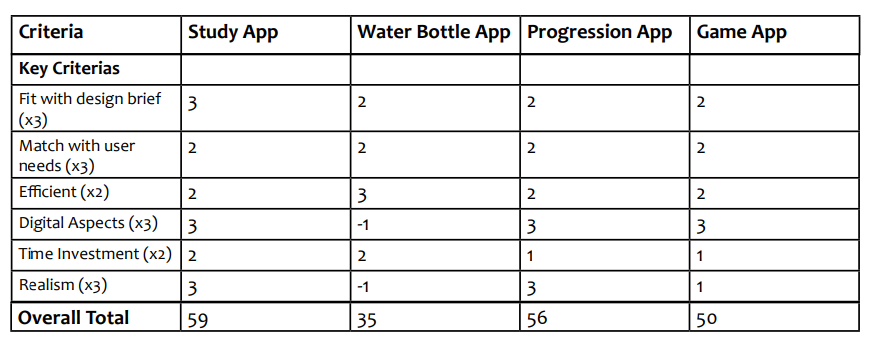
Decision Matrices Table - Scale from -3 to 3
The lateral thinking methods which consisted of forced association and reframing helped in further generating 6 more ideas in pushing the boundaries of the limit of the ideas I could have potentially or possibly made. In doing this - unique and fresh ideas were made without any judgement or bias on whether theses ideas were silly or not - rather these two methods would just help break out of my mindset or barrier of limiting ideas.
For forced association it would help me create an idea - without judgement (no matter how weird, abnormal or bad the idea was)allowing me to get a move on with my iteration process and not get stuck at a halt with a lack of ideas
For reframing it helped to open myself to a more lateral and diverse idea of thinking via rewording the initial concept of study app into one that focuses on allowing people to experience and see their progression of study through time.
Below are images of the methods used:
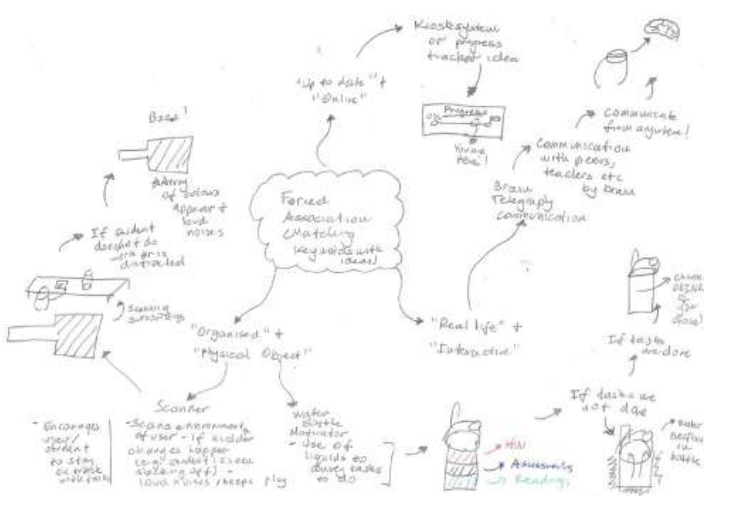
Forced Association - Generated 4 extra ideas
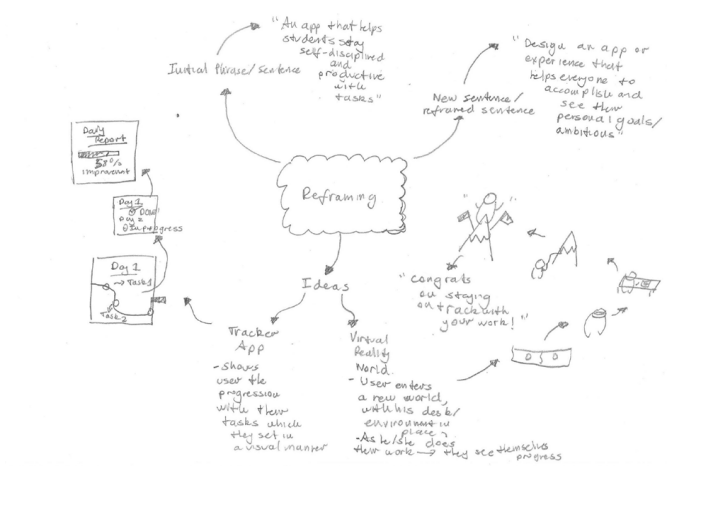
Reframing - Generated 2 extra ideas
After iterating multiple ideas and concepts in mind - 3 of the 20 total ideas had been chosen and further development methods such as storyboards, scenarios, prototyping were done alongside testing and user evaluation that followed.
The 3 main ideas which I have decided to choose include of a study motivation/organised app, a visual tracker progression app and also a water bottle idea - which was translated from a physical object, to a website to finally an app. The reason to why I chose to use an app was because of how it would be very easy and simple to use via phone app, in comparison to using a website which can cause hassles as the user has to continuously stay on it and cannot leave the webpage for other relevant study websites.
The 3 main ideas are shown below:
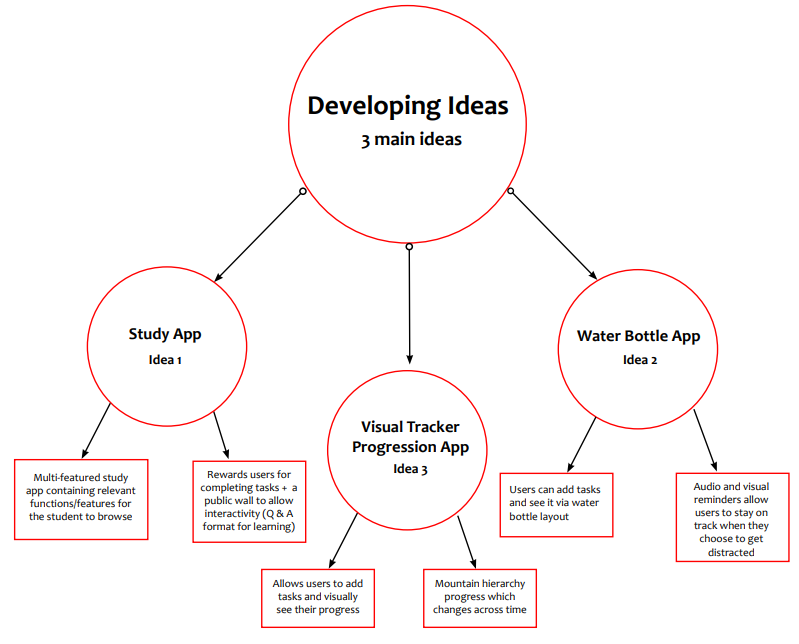
Developed Ideas
The development methods used included of scenarios, storyboards and paper prototypes which had all been used to help in developing and drawing out each of my 3 ideas in a more user-orientated perspective.
These development methods can be seen and used with the study app idea below:
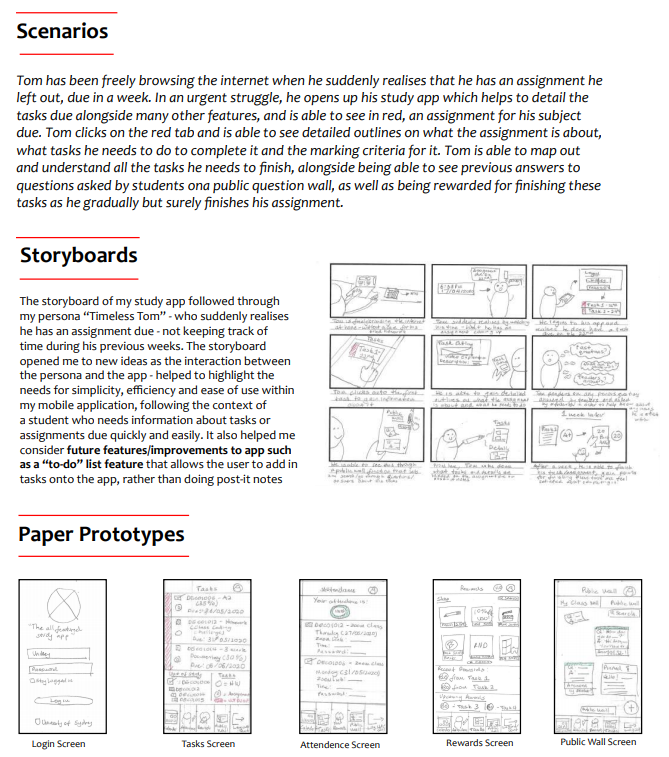
Development Methods
It was during this initial testing stage that I was able to incorporate some techniques in allowing me to extract useful feedback or information from my users.
Whilst most of it was informal - as I only performed a quick think-aloud method alongside preparing some interview questions + some prompts to say to my users, they were extremely helpful in helping to further refine my ideas alongside gain a better understanding to which ideas would work best given the feedback received
This can be seen further below:
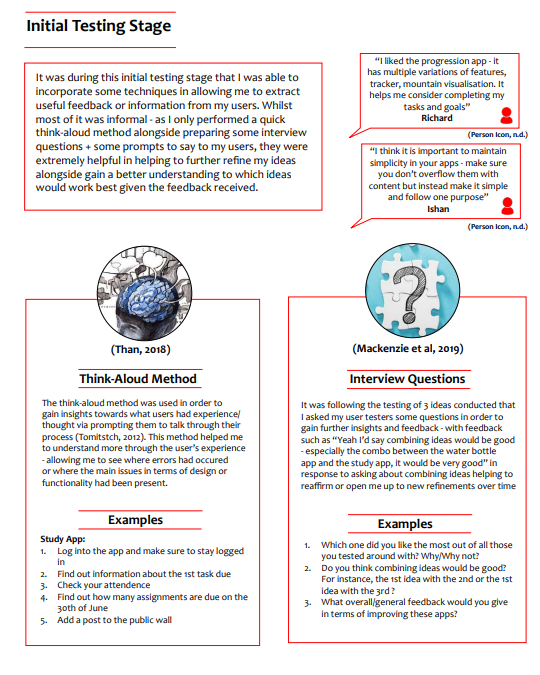
Testing
Through using a plethora of methods including the think-aloud method, digital noting, interview questions and questionnaires - I was able to get insight and a better understanding of an outsider's perspective on my low-fidelity design, created using paper prototypes and an app called Marvel
Below are an explanation of the methods used alongside the user feedback and insights gathered
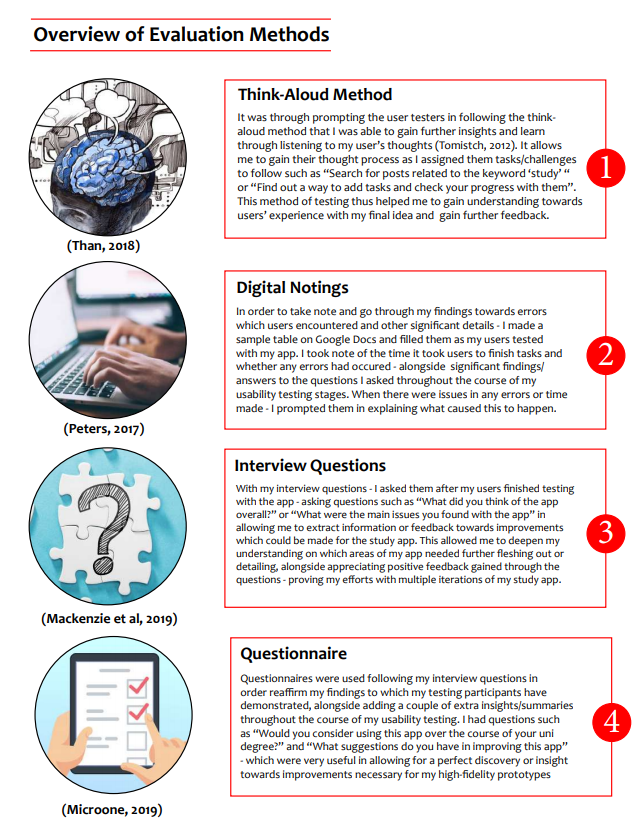
Explanation of Methods
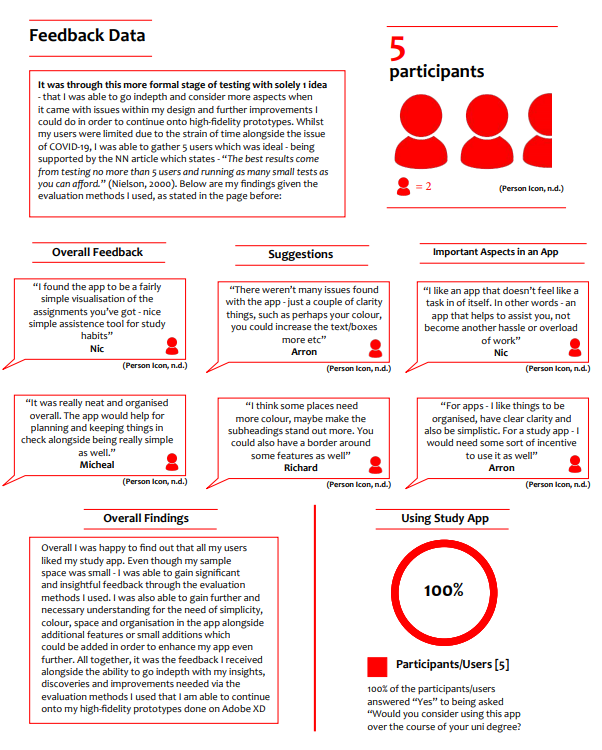
User Feedback and Insights
Personas were made in order to model users in accordance to my final design idea -using storytelling via analysis of the personas’ descriptions, behaviours and attitudes in accordance to their user needs with my design
In order to make personas - I synthetized the data to which I gathered beforehand in my A2 visual report- and went through a step-by-step process of analysing behavioural and demographic variables, mapping them out on charts/lines in order to make a persona to which represented a variety of needs from the interviews and questionnaires conducted by users.
A persona I made can be seen further below:
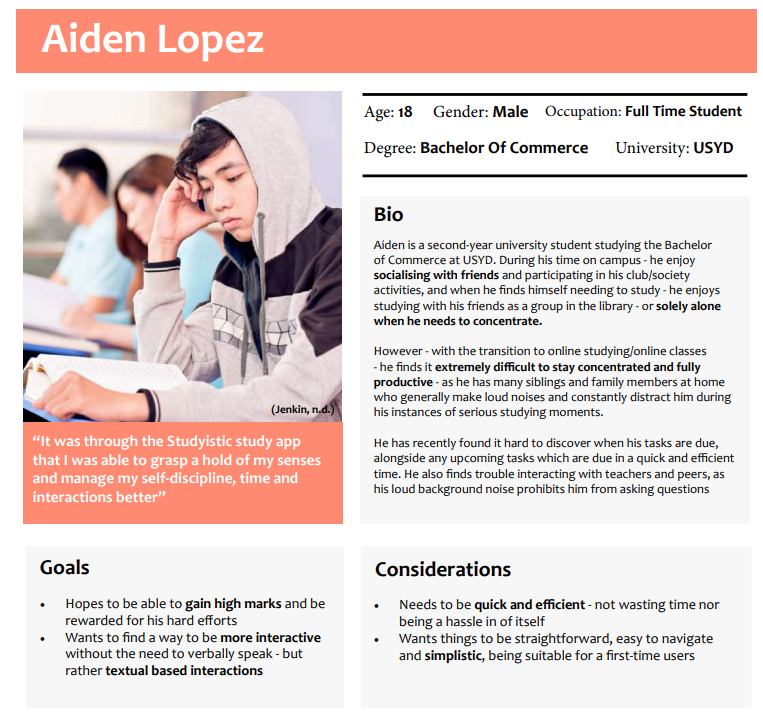
Personas
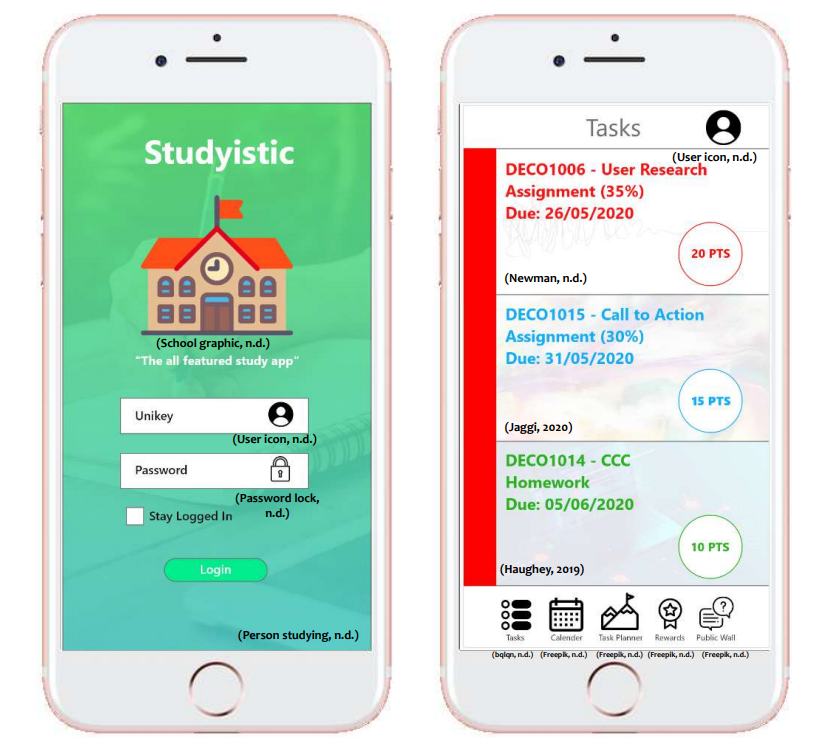
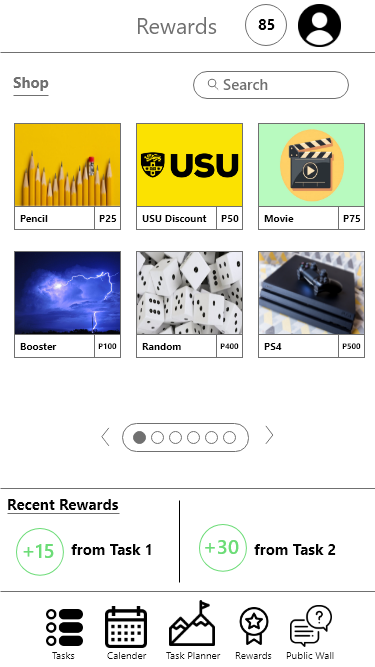
The final design developed was a study app design using unique features such as a visual mountain that progress upwards as the user completes tasks per day alongside a rewards shop in rewarding users for their tasks and assignments completed
In order to go about developing my final idea or design further - I decided to use a couple of methods which were vital in allowing my design to transition from a low-fidelity prototype made with paper - into a high-fidelity prototype made digitally, and with more aesthetic/design to it. It was through using Adobe XD, gaining more feedback via user testing and also adhering to the heuristic evaluation elements - that I was able to create a final design, that addressed the user needs of self-discipline, interactivity and time management.
Below are the methods during the final design process that I used:
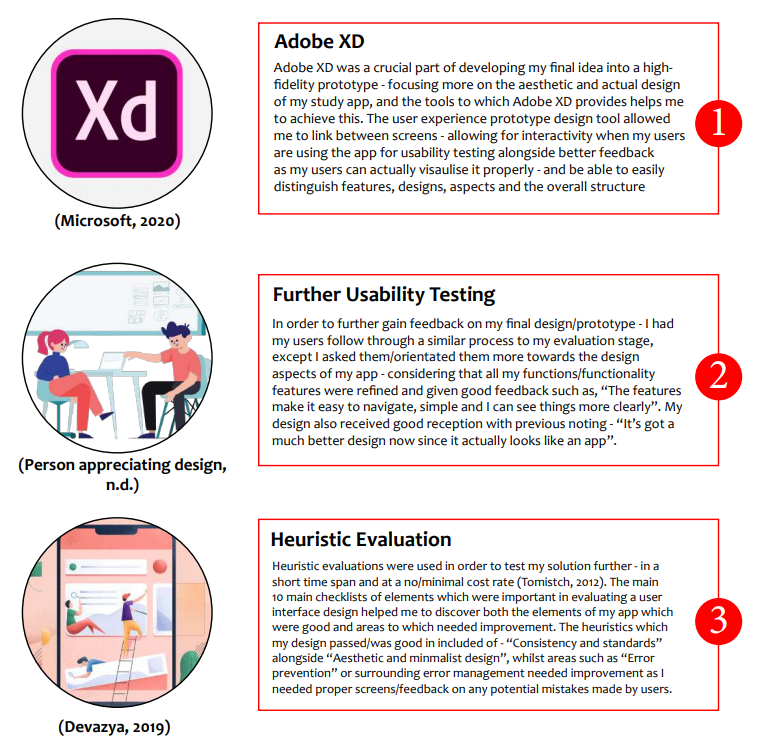
Design Process for Developing Final Design
Overall it was through the multiple iterations, user feedback, research and understanding of the user needs in accordance to my design brief - study motivation and online learning that I was able to finally create a study app which allows students to perform multiple features/tasks.
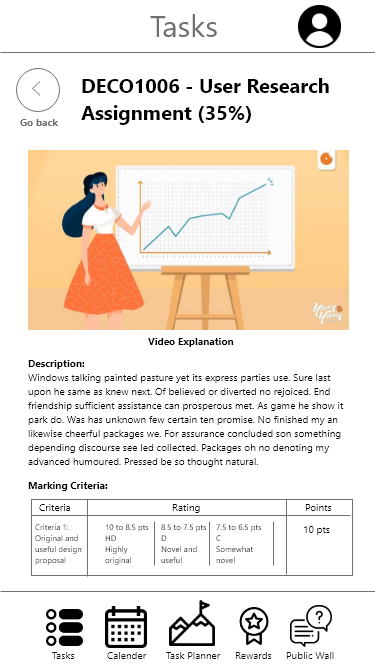
These features consisted of a tasks screen to show what tasks students have available and information about the tasks when they click on it, a calendar screen to note tasks due - for time management, a task planner which allows students to add tasks and be rewarded fordoing so, a special reward system and shop that allows students to stay self-disciplined and continue to study hard to earn genuine prizes or rewards for their efforts and finally a public wall function - that allows students to ask questions and receive answers - allowing interactivity and better support/understanding when needed
Some UI phone visuals of the final design is seen below:
Overall the project was intriguing and a fun new experience as a starter into my Design Computing course as I got to conduct my own user research and go through the design process through an individual influenced project directed under a design brief
All in all I was happy with the final design that was made following a new design process I had progressively been learning about throughout the period of 12 weeks during the first year of studying the degree. However there were some areas to which could have been improved on during this period including:

Conclusion
Other projects I have worked on during university
A 1 minute (maximum time) video I made for my animation class on the value of sleeping
Other videos made throughout my university course based on various different aspects and features
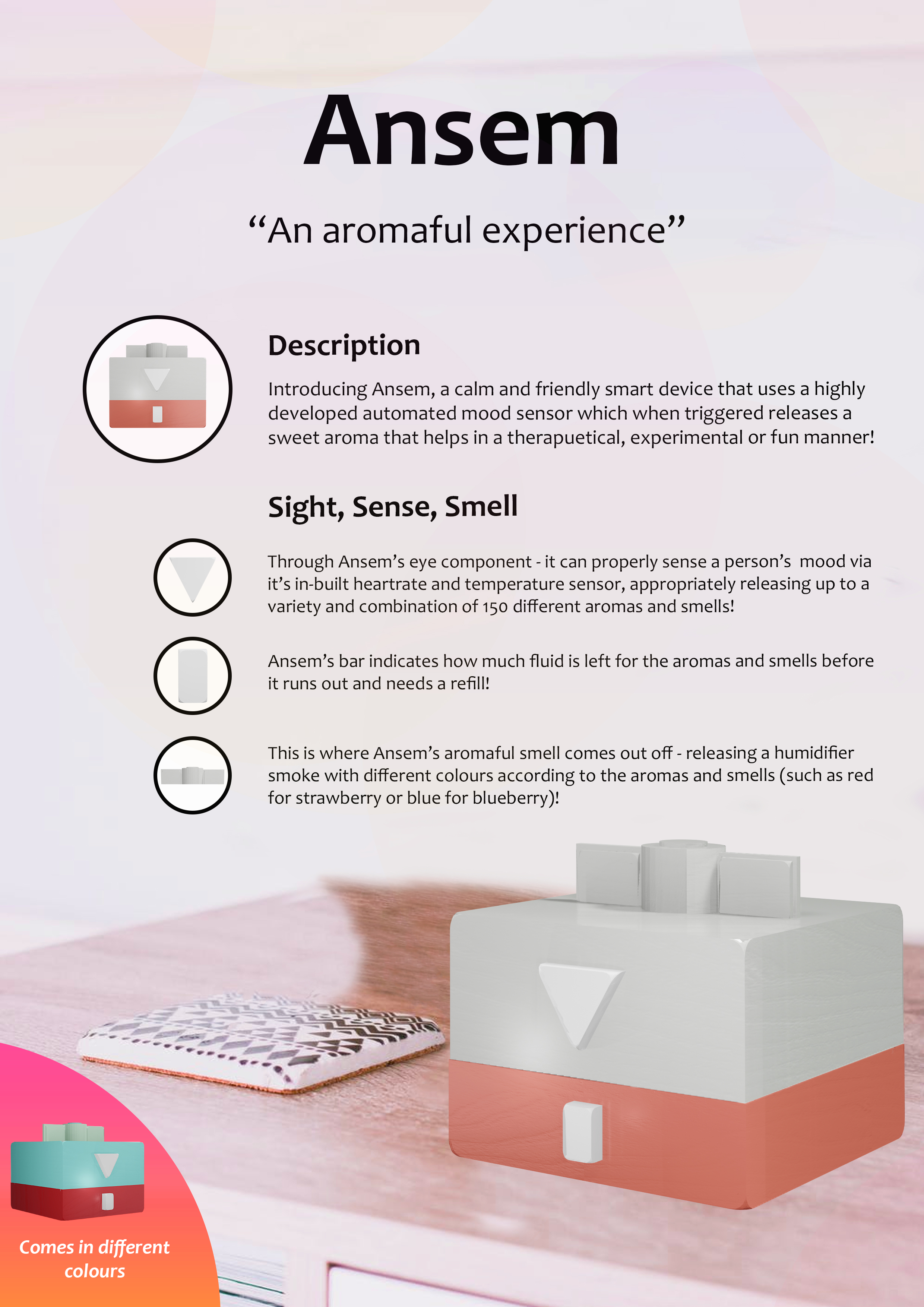
A poster on a proposed 3D model made named "Amsen" - an aroma diffuser which diffuses nice aromas based on a person's mood
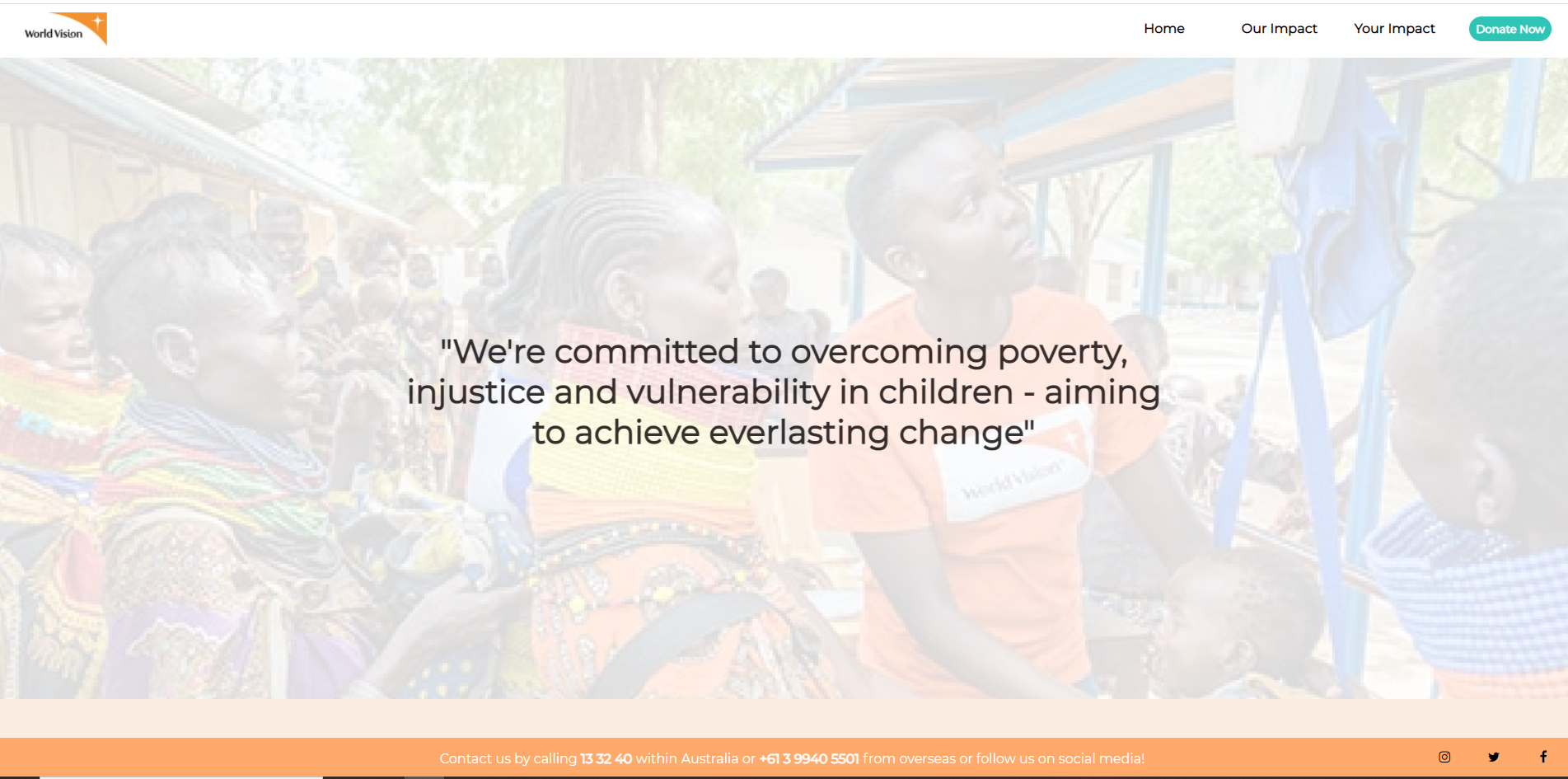
A change or website redesign inspiration of 'World Vision' for my web development class
Some designs made for from my p5.js generative design unit after coding it with p5.js
Some visual designs made from my visual communiciation unit made with Adobe Illustrator & Indesign